# Opening Payment Page as a separate HTML page {#en_PP_method_NewTab .concept}
An article about opening Payment Page as a separate HTML page with the use of the JavaScript library from Ecommpay and in-house solutions.
**Parent topic:**[Options for opening Payment Page](en_PP_Integration.md)
## Overview {#en_pp_opening_html_overview}
When opened as a separate HTML page, the Payment Page payment form is displayed to the customer in a separate browser tab.Depending on the browser operation setup, it can be an active tab, in which the web service page was opened, or a new tab—but in either case, the customer's interaction with the web service is interrupted and the customer is redirected to a different page, which focuses their attention on the purchase. After the purchase, the customer can be redirected back to the web service \([details](en_PP_redirect_modes.md)\).
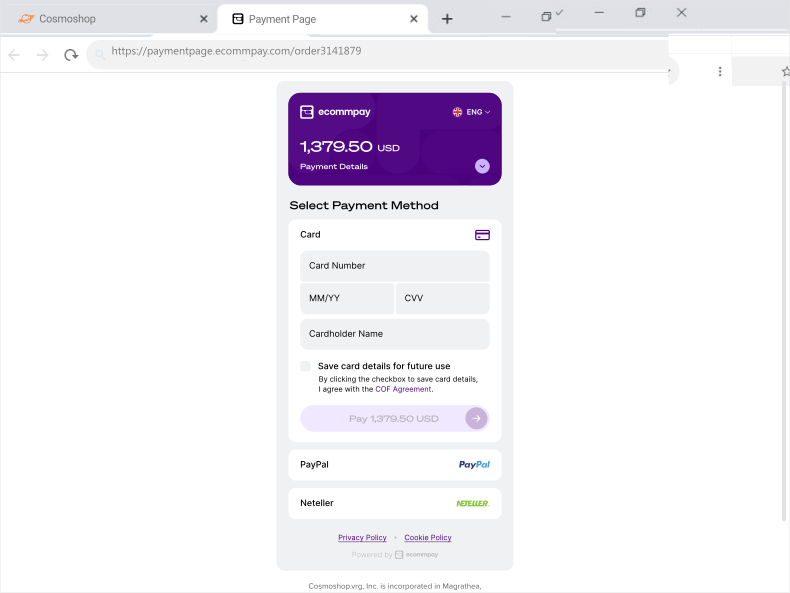
For opening the payment form as a separate page, the following should be performed on the web service side:
1. Define the events upon which the payment form should open\(for example, the purchase button click\).
2. Set up the payment form to open upon the required eventsby using your in-house solutions or the JavaScript library from Ecommpay available at `https://paymentpage.ecommpay.com/shared/merchant.js`. Among other capabilities, this library allows you to automatically use a certain option of Payment Page opening depending on a device. It means the form can be set to open as a separate page on mobile devices and in a modal window or in an iframe element on other devices.
## Opening Payment Page via in-house solutions {#en_pp_opening_html_via_in_house_solutions}
To open the payment form as a separate HTML page, redirect your customer to a URL of the following format:
```
https://paymentpage.ecommpay.com/payment?
```
In this URL, `` is a data string with the names and values of the parameters in pairs \(including the signature\) delimited by the ampersand character \(`&`\). The information about the parameters and signature generation is provided in the following articles: [Payment Page API specification](en_PP_Parameters.md) and [Signature generation and verification](en_platform_signature.md).
```
https://paymentpage.ecommpay.com/payment?project_id=42&customer_id=123&payment_id=4438&payment_amount=1000&payment_currency=EUR&signature=AE5hmtzdP0Dt7qGTg...
```
## Opening Payment Page via the Ecommpay JavaScript library {#en_pp_opening_html_via_javascript_library}
While the JavaScript library provided by Ecommpay is primarily intended to simplify opening of the payment form [in a modal window](en_PP_method_ModalWindow.md) and [in an iframe element](en_PP_method_Embedded.md), it can also be used for opening the form as a separate HTML page. For example, you can set the form to open as a separate page on mobile devices and in a modal window on other devices.
To open Payment Page as a separate page using the JavaScript library `merchant.js` from Ecommpay, link the library on the client side of the web service and use the corresponding calls to the `EPayWidget` object. Beside that, if you plan to use the JavaScript library for other options for the Payment Page opening, you should also link the CSS library available at `https://paymentpage.ecommpay.com/shared/merchant.css`.
**Warning:** Keep in mind that to ensure correct behaviour of the payment form, you must link the Ecommpay CSS library via the CDN \(Content Delivery Network\). Storing this library locally is not allowed.
In the calls to the `EPayWidget` object, the `configObj` object must contain one of the following parameters:
- `redirect_on_mobile` with the value `true`—for opening the payment form as a separate HTML page on mobile devices only;
- `redirect` with the value `true`—for opening the payment form as a separate HTML page on all devices.
If these parameters are not specified or not applicable for the device in use, the payment form opens either in a modal window or in an iframe element \(if this has been specified via the corresponding parameter `target_element`\).
**Note:** If the request for opening the payment form contains the parameters to open Payment Page in a separate tab and in an iframe element, opening the form in a separate tab is given the priority.
Apart from these aspects, the calls to the `EPayWidget` object for opening the form in a separate tab must be made according to the following general conditions that are also relevant for other options to open the payment form:
1. Each call can be made via one of the two methods:
- `bind` \(`EPayWidget.bind`\)—if the payment form should be opened with a button click \(with the button identifier `` specified\).
- `run` \(`EPayWidget.run`\)—if the payment form should be opened upon any other event in the user interface.
2. Each call must contain the JavaScript object `configObj`with the parameters of the payment form opening and the signature for these parameters.
The information about the parameters used and signature generation is provided in the following articles: [Payment Page API specification](en_PP_Parameters.md) and [Signature generation and verification](en_platform_signature.md).
3. If necessary, any call can also contain an HTTP request method \(`method`\)—POST or GET. If nothing is specified, the GET method is used by default.
4. Additionally, any call can contain functions for handling the information about the customer's actions.
The information about such handler functions is provided in the article [Handling events in Payment Page](en_pp_ui_monitoring.md).
```language-javascript
EPayWidget.bind('', configObj, method);
EPayWidget.run(configObj, method);
```
```language-json
EPayWidget.bind('pay_button_id', // Button identifier
{ project_id: 42, // Project identifier
customer_id: '17008', // Customer identifier
payment_id: '18641868', // Payment identifier
payment_amount: 8855, // Payment amount
payment_currency: 'USD', // Payment currency code
redirect_on_mobile: true, // Indicator for opening the form as a separate HTML page
// on mobile devices
signature: 'YWb6Z20ByxpQ30hfTI' }, // Signature
'post')
```
```language-json
EPayWidget.run(
{ project_id: 42, // Project identifier
customer_id: '17008', // Customer identifier
payment_id: '18641868', // Payment identifier
payment_amount: 8855, // Payment amount
payment_currency: 'USD', // Payment currency code
redirect_on_mobile: true, // Indicator for opening the form as a separate HTML page
// on mobile devices
signature: 'YWb6Z20ByxpQ30hfTI' }, // Signature
'post')
```
When either of the methods \(`bind` and `run`\) is used, the HTML code of the web service page looks as follows.
```language-xml
```