# Paypal {#pm_paypal}
An article about the payment method which allows you to process payments in different currencies by using e-wallets in different countries and supports one-time one-step and two-step purchases, credential-on-file purchases, refunds, and payouts.
**Parent topic:**[Digital wallet payments](en_pm_ewallet.md)
## Overview {#en_pm_paypal_overview}
An article about the payment method which allows you to process payments in different currencies by using e-wallets in different countries and supports one-time one-step and two-step purchases, credential-on-file purchases, refunds, and payouts.
### Introduction {#section_t5z_rlg_ytb .section}
Paypal is a payment method which allows to process payments in different currencies by using the Paypal e-wallet in different countries.This method supports one-time one-step and two-step purchases, credential-on-file purchases, refunds and payouts.
This article provides information about working with the Paypal method: general insights are presented in the Overview section, while information about the actions required to process payments and perform other actions is presented in the sections that follow.
### General information {#section_tbf_2zk_ggb .section}
|Payment method type|digital wallet payments|
|Payment instruments|digital wallets|
|Countries and regions|in accordance with [the list](https://www.paypal.com/en/webapps/mpp/country-worldwide)|
|Payment currencies|[AUD](references/en/currencies/AUD.md), [BRL](references/en/currencies/BRL.md) \(only in Brazil\), [CAD](references/en/currencies/CAD.md), [CZK](references/en/currencies/CZK.md), [DKK](references/en/currencies/DKK.md), [EUR](references/en/currencies/EUR.md), [HKD](references/en/currencies/HKD.md), [HUF](references/en/currencies/HUF.md), [INR](references/en/currencies/INR.md) \(only in India\), [ILS](references/en/currencies/ILS.md), [JPY](references/en/currencies/JPY.md), [MYR](references/en/currencies/MYR.md) \(only in Malaysia\), [MXN](references/en/currencies/MXN.md), [TWD](references/en/currencies/TWD.md), [NZD](references/en/currencies/NZD.md), [NOK](references/en/currencies/NOK.md), [PHP](references/en/currencies/PHP.md), [PLN](references/en/currencies/PLN.md), [GBP](references/en/currencies/GBP.md), [SGD](references/en/currencies/SGD.md), [SEK](references/en/currencies/SEK.md), [CHF](references/en/currencies/CHF.md), [THB](references/en/currencies/THB.md), [USD](references/en/currencies/USD.md)|
|Currency conversion|on the Ecommpay side|
|One-time purchases|+|
|Credential-on-file purchases|+|
|Full refunds|+|
|Partial refunds|+|
|Payouts|+|
|Chargebacks|+|
|Notes|- amounts in [HUF](references/en/currencies/HUF.md), [JPY](references/en/currencies/JPY.md), [TWD](references/en/currencies/TWD.md) currencies must be indicated in major currency units \(without the decimal part\)
- for merchants registered in the USA there are limitations regarding regions available for payment processing \(for more information refer to your Ecommpay key account manager\)
- the maximum allowed time for holding funds is calculated starting from the moment the `auth` operation is created in the Ecommpay payment platform and is three days by default, after which the automatic release of funds \(`cancel`\) is performed. To reduce the allotted time or change the operation type to withdrawal \(`capture`\) refer to your Ecommpay key account manager.
|
|Onboarding and access fee|in accordance with the procedure, presented further, additional information is available in [Ecommpay shop](https://ecommpay.com/shop/payment-methods/paypal/)|
### Onboarding {#section_hjm_12j_5yb .section}
To enable this payment method the merchant needs to grant Ecommpay the rights to process payments in the Paypal service \(onboarding\). Such rights include the right to process purchases and refunds and the right to process payouts. To grant any of these rights the merchant is required to do the following:
1. Inform the Ecommpay key account manager about the readiness to enable the Paypal payment method.
2. Receive the email with the link to Paypal website from Ecommpay.
3. Follow the link and grant Ecommpay the right to process payments. An existing Paypal business account can be used or a new one can be registered.
4. Receive the email from Ecommpay which confirms the right to process payments with the specified Paypal merchant identifier. After that, the technical setup on the Ecommpay side must be performed. Usually the setup is complete within three days.
5. Receive the email from Ecommpay which confirms the readiness to process payments by using the Paypal method. After that, the onboarding is complete and the payment method is ready to be used.
If necessary, any of the granted rights may be revoked by the merchant on the side of the Paypal service upon confirmation with the Ecommpay key account manager.
### Interaction diagram {#section_tsp_gzk_ggb .section}
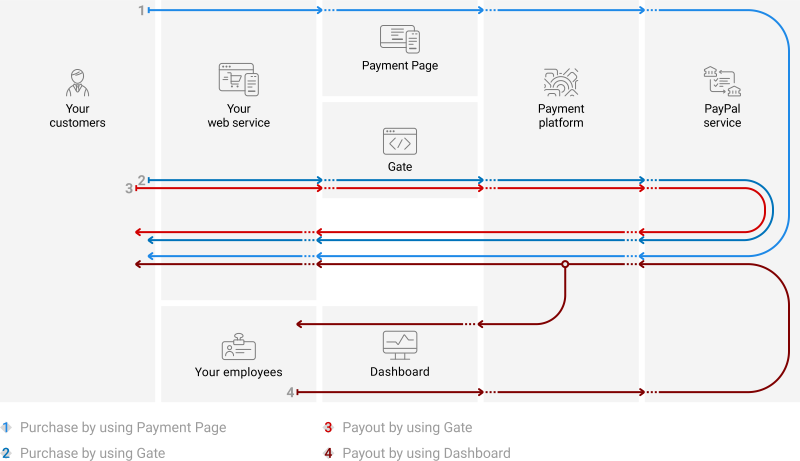
Payment processing by using the Paypal payment method involves the merchant's web service, one of Ecommpay interfaces, and the Ecommpay payment platform,and technical facilities of the Paypal service.
### Operations support {#section_rnx_4cl_ggb .section}
Various platform interfaces can be used to process payments and perform operations using the Paypal method. Purchases can be processed by using Payment Page, Gate and Dashboard \(using payment links\), refunds and payouts—by using Gate and Dashboard. At the same time, regardless of the interfaces used, the following properties and limitations are applicable.
| |Amounts, [USD](references/en/currencies/USD.md)¹|Times²|
|minimum|maximum|basic|threshold|
|--|------------------------------------------------|------|
|-------|-------|-----|---------|
|Purchases|–|60,000.00 \*|1 minute|3 days|
|Payouts|–|\*|1 minute|30 days|
|Full refunds|–|–|–|35 days|
|Partial refunds|–|–|–|35 days|
**Note:**
1. For more information refer to your Ecommpay key account manager.
2. The base and threshold times are defined as follows:
- *The base time* is the average estimated time between the moment a payment is initiated in the payment platform to the moment the payment result is sent to the web service. The base time evaluation is made on the assumption of normal operation of all technical facilities and communication channels and typical customer behaviour. Use the base time to estimate when to react to the absence of payment result callbacks or when to check payment status \([details](en_Gate_payment_status_request.md)\).
- *The threshold time* is the maximum possible time between the moment a payment is initiated in the payment platform to the moment the web service receives the callback with the payment result. A payment is automatically assigned the `decline` status if it wasn't processed within the threshold time. For individual customisation of the threshold time limit, contact Ecommpay technical support.
### Processing scenarios {#section_fgt_sdl_ggb .section}
To perform a purchase operation, you need to redirect a customer to the Paypal service, while to make a refund, you need to receive a request from the customer and notify the customer about the result of the refund via the web service. To initiate a payout, you need to notify the customer via the web service.
The customer scenario of a one-step purchase via Payment Page looks like this.
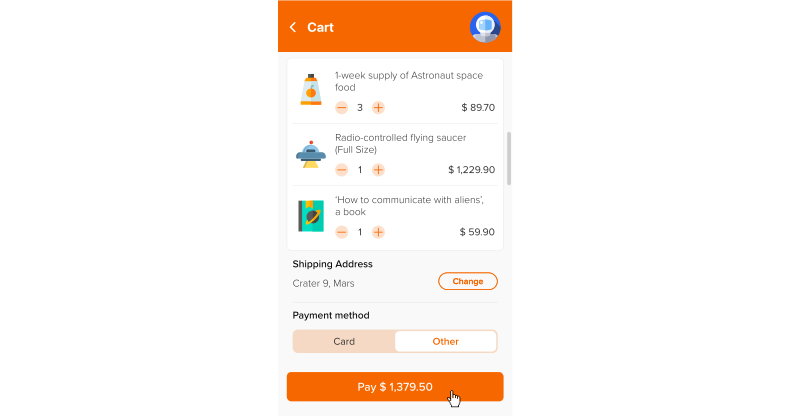
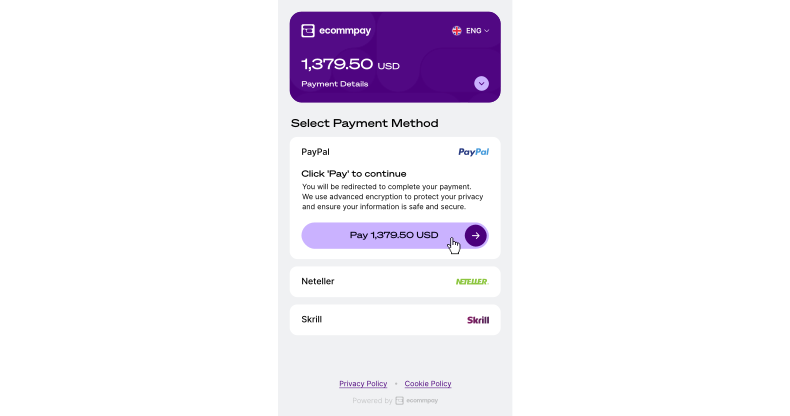
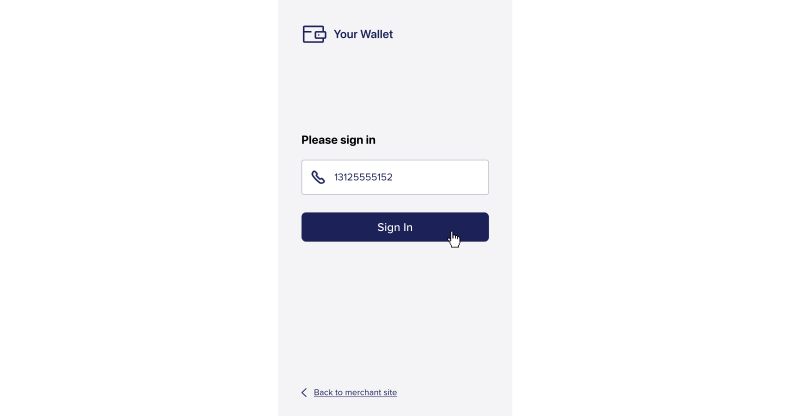
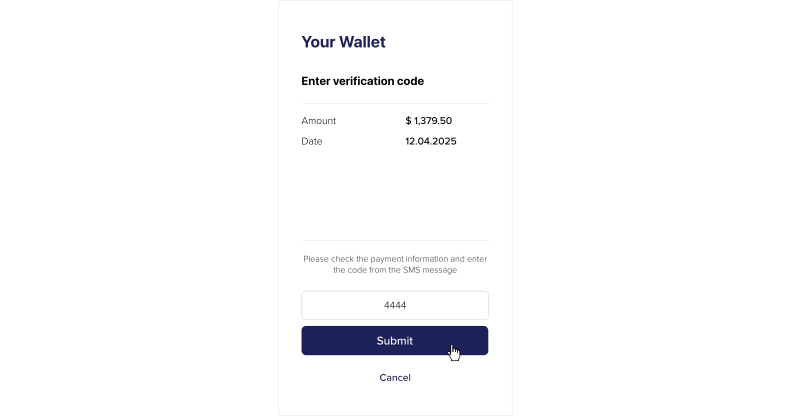
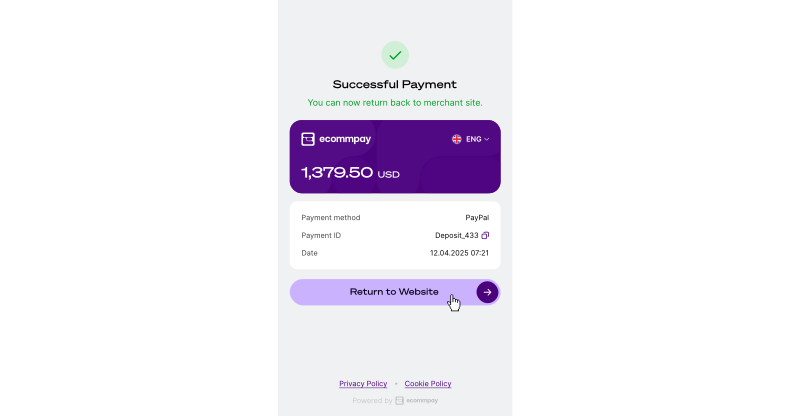
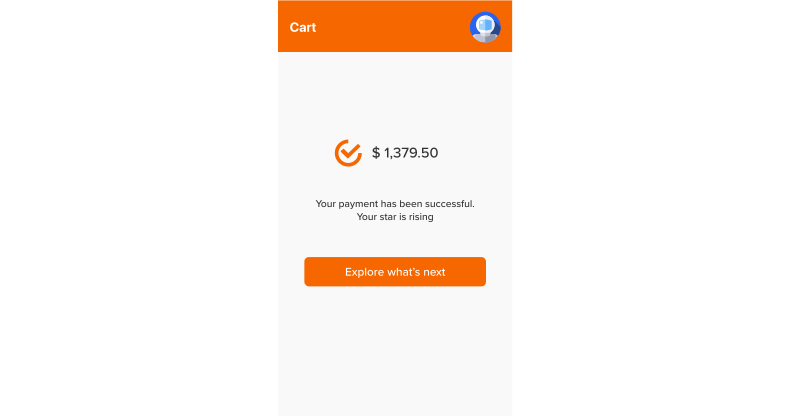
General scenarios of processing purchases and payouts can be presented as follows.
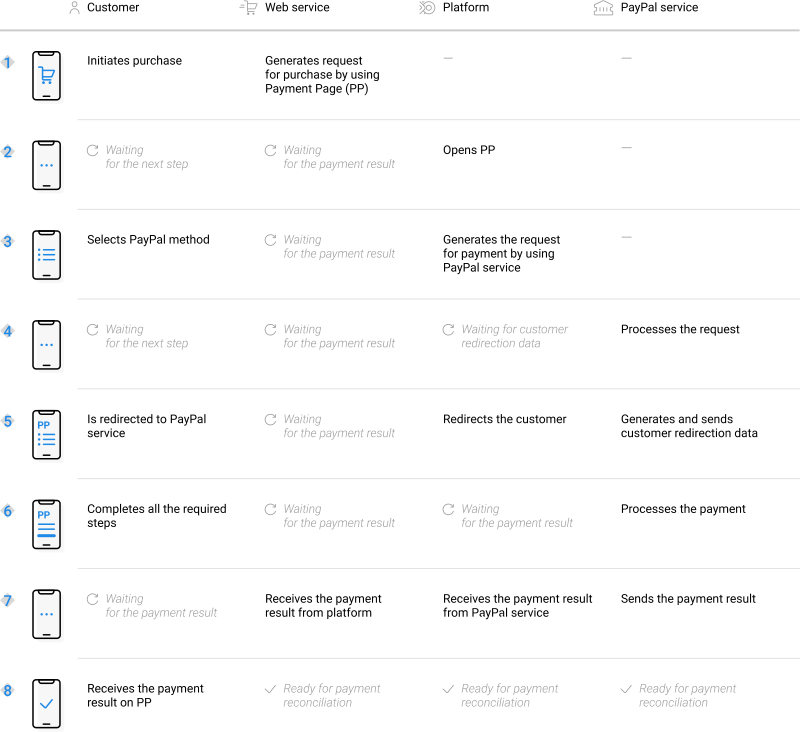
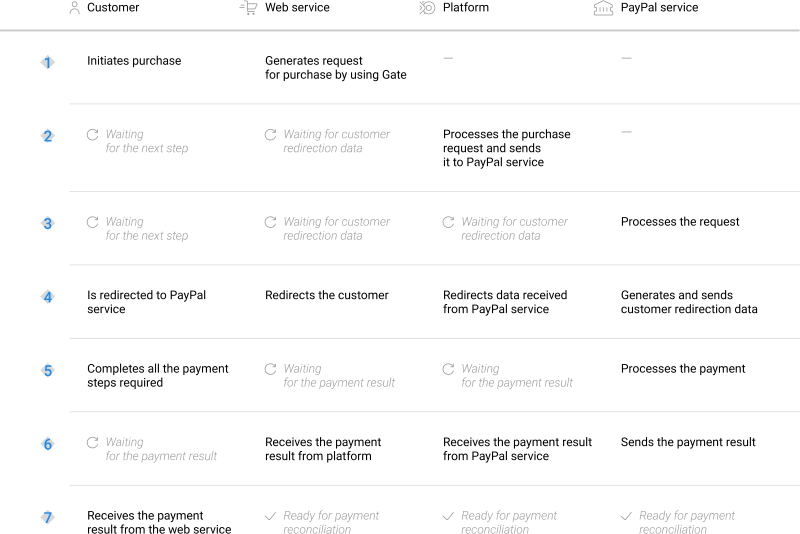
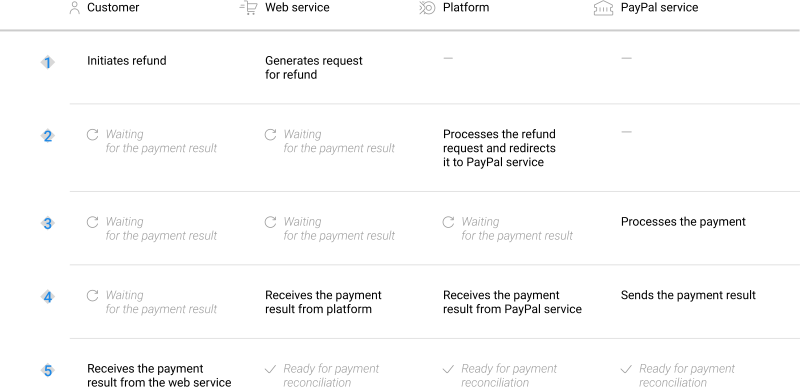
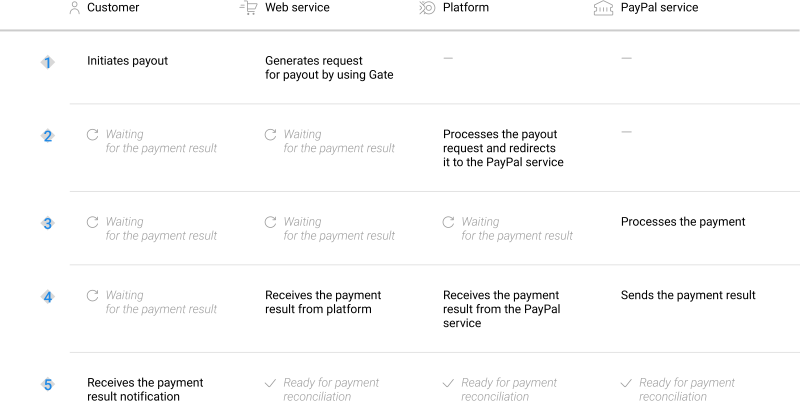
Scenarios for performing operations via the main interfaces of the payment platform correspond to those presented in the diagrams. Similarly, when additional features \(such as payment links\) are used, scenarios for performing operations also correspond to the specifics of those features.
## One-time purchases by using Payment Page {#en_pm_paypal_pp_purchase}
### General information {#section_gtg_vxk_m2b .section}
To process a purchase through Payment Pageby using the Paypal method, the merchant's web service is required to send a request with all required parameters and signature to the Ecommpay URL and receive a callback with the result. In case of a two-step purchase, it might be required, at a later point, to confirm the capture of the held funds.The full sequence and special aspects of one-step purchase processing are provided below.
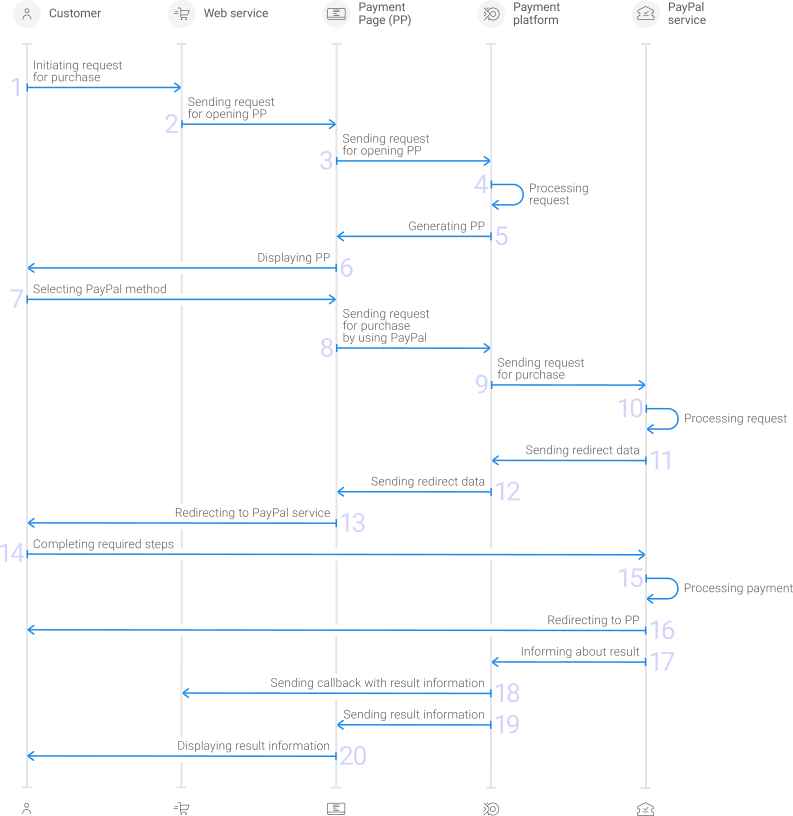
1. A customer initiates a purchase in the web service.
2. The web service sends the request for opening Payment Page to the specified Ecommpay URL.
3. The request for opening Payment Page is sent to the payment platform.
4. The payment platform receives the request and validates the required parameters and signature.
5. Payment Page is generated based on the project and request parameters.
6. Payment Page is displayed to the customer.
7. The customer selects the Paypal method.
8. The payment platform receives the request for processing the payment by using the Paypal method.
9. The payment platform processes the request and sends it to the Paypal service.
10. The request is processed on the Paypal service side.
11. The data for redirecting the customer to the Paypal service is sent from the Paypal service to the payment platform.
12. The data for redirecting the customer is sent from the payment platform to Payment Page.
13. The customer is redirected to the Paypal service.
14. The customer completes all required payment steps.
15. The purchase is processed on the in the Paypal service.
16. The customer is redirected to Payment Page.
17. The Paypal service sends a notification about the result to the payment platform.
18. The payment platform sends the payment result callback to the web service.
19. The payment platform sends the result information to Payment Page.
20. The result information is displayed to the customer on Payment Page.
In case of a two-step purchase, the process of placing the authorisation hold via Payment Page using the Paypal method is identical to the workflow sequence of a one-step purchase, with the exception that instead of an immediate debiting of funds an authorisation hold is initiated and executed.
Information about the formats of requests and callbacks used for processing payments by using the Paypal method via Payment Page is presented further in this section; general information about working with the Payment Page API is presented in [Interaction concepts](en_pp_interaction_organisation.md).
### Request format {#section_p5j_fgl_ggb .section}
There are several things you need to consider when sending purchase requests by using the Paypal method:
1. The following parameters required for any payment must be specified:
- `project_id`—project identifier obtained from Ecommpay during integration
- `payment_id`—payment identifier unique within the project
- `payment_currency`—payment currency code in the ISO-4217 alpha-3 format
- `payment_amount`—payment amount in the smallest currency unit
- `customer_id`—customer identifier unique within the project
2. To specify the type of purchase that is different from the default one set for the specific project, pass `sale` \(for immediate withdrawal of funds during one-step purchase processing\) or `auth`\(to place an authorisation hold during two-step purchase processing\) in the `operation_type` parameter.
3. Depending on the merchant business type, to improve payment acceptance rate, it may be relevant to specify the following parameters \(partially or completely; information on parameters recommended in specific cases can be clarified with the Ecommpay account manager\):
- `customer_email`—customer email address;
- `customer_first_name`—customer first name;
- `customer_last_name`—customer last name;
- `customer_country`—customer country code in ISO 3166-1 alpha-2 format;
- `customer_phone`—customer phone number;
- `payment_methods_options`—a string object the name of which is the `paypal_wallet` method indicator and the value of which is the `additional_data` object containing additional customer information, using string data type:
- `sender_create_date`—customer account creation time \(UTC+0\) in ISO 8601 format \(for example `2022-01-25T10:15:30+00:00`\);
- `payments_count`—number of payments made by the merchant's web service for the customer during the previous three months before the payment was initiated;
- `pin_verification`—determines whether the customer's identity for this payment is confirmed using a PIN code \(if yes—`Y` must be specified in the value, if no—`N`\);
- `face_id_verification`—determines whether the customer's identity for this payment is confirmed using a facial recognition system \(if yes—`Y` must be specified in the value, if no—`N`\);
- `additional_verification`—a combination of four indicators that mark the fulfillment of a number of conditions for confirming information about the customer on the web service side in a given sequence. These indicators must be specified in string format, in the specified sequence and without a delimiter. The numbers `0` or `1` should be used as such indicators \(`0`—not confirmed, `1`—confirmed\). The sequence is the following:
1. Phone number confirmation
2. Identifying photo confirmation
3. Payment card confirmation
4. Bank account confirmation
Example: `1101`.
- `ota_type`—OTA \(online travel agency\) type \(for example `Car rental`\)
- `ota_service_start_date`—OTA service start time \(UTC+0\) in ISO 8601 format \(for example `2022-01-25T10:15:30+00:00`\)
- `ota_service_end_date`—OTA service end time \(UTC+0\) in ISO 8601 format \(for example `2022-01-25T10:15:30+00:00`\)
- `ota_change_guest_t_f`—indicates whether the customer is able to be changed \(if yes—`1`, if no—`0`, using string data type\)
- `ota_start_country`—code of the country where the services start to be provided to the customer
- `ota_start_city`—name of the city where the services start to be provided to the customer
- `ota_start_zipcode`—full zip code of the place where the services start to be provided to the customer
4. If you need to have the payment form displayed with the Paypal method selected, set the `force_payment_method` parameter to `paypal-wallet`.
5. Additionally, any other parameters available for working with Payment Page can be used \([details](en_PP_Parameters.md)\).
6. After all target parameters are specified, generate a signature \([details](en_platform_signature.md)\).
Thus, a correct request for opening the payment form using the Paypal method must contain the project identifier, basic payment information \(identifier, amount, and currency code\), customer information, signature, as well as possible additional parameters.
``` {#codeblock_wrp_ngl_5dc .language-json}
{
"project_id": 120,
"payment_id": "580",
"payment_amount": 100000,
"payment_currency": "USD",
"customer_id": "customer1",
"payment_methods_options": {"paypal_wallet":{"additional_data":{"sender_create_date": "2022-01-25T10:15:30+00:00", "payments_count": "123", "pin_verification": "Y", "face_id_verification": "N","additional_verification": "1101", "ota_type": "Car rental", "ota_service_start_date": "2022-01-26T10:15:30+00:00", "ota_service_end_date": "2022-02-25T10:15:30+00:00", "ota_change_guest_t_f": "0", "ota_start_country": "US", "ota_start_city": "Dallas", "ota_start_zipcode": "12345"}}}
"signature": "kUi2x9dKHAVNU0FYldOcZzUCwX6R\/ekpZhkIQg=="
}
```
``` {#codeblock_m4r_ngl_5dc .language-json}
{
"project_id": 120,
"payment_id": "580",
"payment_amount": 100000,
"payment_currency": "USD",
"customer_id": "customer1",
"payment_methods_options": {"paypal_wallet":{"additional_data":{"sender_create_date": "2022-01-25T10:15:30+00:00", "payments_count": "123", "pin_verification": "Y", "face_id_verification": "N","additional_verification": "1101", "ota_type": "Car rental", "ota_service_start_date": "2022-01-26T10:15:30+00:00", "ota_service_end_date": "2022-02-25T10:15:30+00:00", "ota_change_guest_t_f": "0", "ota_start_country": "US", "ota_start_city": "Dallas", "ota_start_zipcode": "12345"}}}
"signature": "kUi2x9dKHAVNU0FYldOcZzUCwX6R\/ekpZhkIQg=="
}
```
### Callback format {#section_dpx_2hl_ggb .section}
The Paypal method uses the standard format for callbacks to deliver purchase results. For more information, see [Handling callbacks](en_platform_callbacks.md).
The following is the example of a callback with an information about a `10.00 USD` purchase in the `210` project.
```language-json
{
"project_id": 210,
"payment": {
"id": "test_payment_1",
"type": "purchase",
"status": "success",
"date": "2019-12-25T09:48:29+0000",
"method": "PayPal Wallet",
"sum": {
"amount": 1000,
"currency": "USD"
},
"description": ""
},
"account": {
"number": "VSAFYPWDD123"
},
"customer": {
"id": "7895623"
},
"operation": {
"id": 63460000012251,
"type": "sale",
"status": "success",
"date": "2019-12-25T09:48:29+0000",
"created_date": "2019-12-25T09:47:54+0000",
"request_id": "55aa73dcab3dd0a37f3a4eeb72f7-00063461",
"sum_initial": {
"amount": 1000,
"currency": "USD"
},
"sum_converted": {
"amount": 1000,
"currency": "USD"
},
"code": "0",
"message": "Success",
"provider": {
"id": 1556,
"payment_id": "14C27062M77937123",
"auth_code": "",
"date": "2019-12-25T09:48:27+0000"
}
},
"signature": "bLraFo85nfQ+kMyaximHVkuL3THI1oHRkukafnk3A=="
}
```
The following is the example of a callback with information about a declined purchase.
```language-json
{
"project_id": 210,
"payment": {
"id": "test_payment_2",
"type": "purchase",
"status": "decline",
"date": "2019-12-18T09:00:07+0000",
"method": "PayPal Wallet",
"sum": {
"amount": 900,
"currency": "USD"
},
"description": "test_paypal"
},
"customer": {
"id": "156787"
},
"operation": {
"id": 55628000009581,
"type": "sale",
"status": "decline",
"date": "2019-12-18T09:00:07+0000",
"created_date": "2019-12-18T08:59:30+0000",
"request_id": "b8d98d70def1760df9f52dc00ffb6-00055629",
"sum_initial": {
"amount": 900,
"currency": "USD"
},
"sum_converted": {
"amount": 900,
"currency": "USD"
},
"code": "20000",
"message": "General decline",
"provider": {
"id": 1556,
"payment_id": "",
"auth_code": ""
}
},
"signature": "OEDB1Gox..TOaeB+W8q64WLUnsj6gsW5qen7MrDC2o3Rg=="
}
```
### Useful links {#section_xpz_thl_ggb .section}
The following articles can be useful when implementing purchases via Payment Page:
- [Interaction concepts](en_pp_interaction_organisation.md)—about the interaction with the payment platform by using Payment Page.
- [Signature generation and verification](en_platform_signature.md)—about the procedure of generating and verifying signatures in requests and callbacks.
- [Payment processing](en_platform_payment_model.md)—about the types, processing models, and possible statuses of supported payments and operations.
- [One-time one-step purchase](en_platform_sms_model.md)—about processing of one-time one-step purchases by using Payment Page.
- [Handling operation processing information](en_platform_payment_info_codes.md)—about error and response codes that are used in the payment platform to record information about performing of operations.
## COF purchases by using Payment Page {#en_pm_paypal_pp_recurring}
### General information {#section_gtg_vxk_m2b .section}
The Paypal payment method provides the ability to perform COF purchases—regular on-demand payments. For more information about COF purchases, see [On-demand COF purchase](en_platform_recurring_model.md).
Registration of a COF purchases is also available by using Payment Page. For registration the web service must send a request containing the required parameters and signature, as well as data for registering a COF purchase in the `recurring` object, to the Ecommpay URL and accept a callback with the result. In the callback about registering a COF purchase, you will get its ID, which you need to use to make or cancel regular payments via Gate. For more information, see [COF purchases by using Gate](pm_paypal.md).
Information about the formats of requests and callbacks used for processing payments by using the Paypal method via Payment Page is presented further in this section; general information about working with the Payment Page API is presented in [Interaction concepts](en_pp_interaction_organisation.md).
### Request format {#section_p5j_fgl_ggb .section}
There are several things you need to consider when creating requests to open a payment form for registering COF purchases by using the Paypal method:
1. The following parameters required for any payment must be specified:
- `project_id`—project identifier obtained from Ecommpay during integration
- `payment_id`—payment identifier unique within the project
- `payment_currency`—payment currency code in the ISO-4217 alpha-3 format
- `payment_amount`—payment amount in the smallest currency unit
- `customer_id`—customer identifier unique within the project
2. If you need to have the payment form displayed with the Paypal method selected, set the `force_payment_method` parameter to `paypal-wallet`.
3. For specifying the properties of a COF purchase, the request should contain the `recurring` parameter as a JSON object—if the payment form is opened via the JavaScript library of Ecommpay—or as a string generated as a result of URL encoding—if the payment form is opened via another method. The `recurring` parameter must contain the main details about COF purchase registration:
- `register`, boolean—indicator that specifies whether a COF purchase should be registered.
- `type`, string—type of the COF purchase to register, possible values:
- `U`—autopurchase
- `R`—regular purchase
- `period`, string—frequency of debits \(for a regular COF purchase\), possible values:
- `D`—daily
- `W`—weekly
- `M`—monthly \(if the set day is not available in the next month, for example, 31, the payment is performed on the last day of the month\)
- `Q`—quarterly
- `Y`—annually
- `time`, string—time of performing subsequent debits \(for a regular COF purchase\) in the `hh:mm:ss` format. The parameter is used if the `period` parameter is specified in the request.
- `interval`, string—multiplier to increase debiting frequency \(i.e. the interval of performing regular COF purchases\). This parameter is used in conjunction with the `period` parameter and should be assigned a numeric value from `1` to `100`.
4. For specifying the properties of a regular purchase, the `recurring` parameter can also contain other details:
- `amount`, integer—fixed amount of subsequent debits \(for a regular COF purchase\) in the smallest currency unit.
- `start_date`, string—date on which the first debit operation is performed \(for a COF regular purchase\). This parameter is used in conjunction with the `scheduled_payment_id` parameter and should be specified in the `DD-MM-YYYY` format.
- `expiry_day`, integer orstring—calendar day on which the specified duration period of the COF purchase will end \(the value should be provided as an integer from `1` to `31`, without a leading zero, in accordance with the Gregorian calendar\).
- `expiry_month`, integer orstring—month in which the specified duration period of the COF purchase will end \(the value should be provided as an integer from `1` to `12`, without a leading zero, in accordance with the Gregorian calendar\).
- `expiry_year`, integer—year in which the specified duration period of the COF purchase will end \(in the `YYYY` format, in accordance with the Gregorian calendar\).
**Note:** If any of the parameters defining the expiry date of the COF purchase is not provided in the request, the following default values apply:
- Calendar day—the last calendar day of the relevant month \(as specified in the `expiry_month` parameter or corresponding to the COF purchase registration date\).
- Month—the month in which the COF purchase was registered.
- Year—the year that is 10 years after the year in which the COF purchase was registered.
Accordingly, if only the year is specified, the expiry date is set to the last calendar day of the month in which the COF purchase was registered and the specified year.
- `scheduled_payment_id`, string—identifier assigned to the payment within which scheduled debits are performed. It must differ from the identifier of the payment made to register a COF purchase and must be unique within the project. Also, not to be confused with the debiting series record identifier specified in the `id` parameter of the `recurring` object that is passed in the callback with the COF purchase registration information.
**Warning:** If the identifier that should be assigned to the COF purchase \(`scheduled_payment_id`\) matches the identifier of the payment made to register a COF purchase \(`payment_id`\), the request to register a COF purchase is declined.
5. Depending on the merchant business type, to improve payment acceptance rate, it may be relevant to specify the following parameters \(partially or completely; information on parameters recommended in specific cases can be clarified with the Ecommpay account manager\):
- `customer_email`—customer email address;
- `customer_first_name`—customer first name;
- `customer_last_name`—customer last name;
- `customer_country`—customer country code in ISO 3166-1 alpha-2 format;
- `customer_phone`—customer phone number;
- `payment_methods_options`—a string object the name of which is the `paypal_wallet` method indicator and the value of which is the `additional_data` object containing additional customer information, using string data type:
- `sender_create_date`—customer account creation time \(UTC+0\) in ISO 8601 format \(for example `2022-01-25T10:15:30+00:00`\);
- `payments_count`—number of payments made by the merchant's web service for the customer during the previous three months before the payment was initiated;
- `pin_verification`—determines whether the customer's identity for this payment is confirmed using a PIN code \(if yes—`Y` must be specified in the value, if no—`N`\);
- `face_id_verification`—determines whether the customer's identity for this payment is confirmed using a facial recognition system \(if yes—`Y` must be specified in the value, if no—`N`\);
- `additional_verification`—a combination of four indicators that mark the fulfillment of a number of conditions for confirming information about the customer on the web service side in a given sequence. These indicators must be specified in string format, in the specified sequence and without a delimiter. The numbers `0` or `1` should be used as such indicators \(`0`—not confirmed, `1`—confirmed\). The sequence is the following:
1. Phone number confirmation
2. Identifying photo confirmation
3. Payment card confirmation
4. Bank account confirmation
Example: `1101`.
- `ota_type`—OTA \(online travel agency\) type \(for example `Car rental`\)
- `ota_service_start_date`—OTA service start time \(UTC+0\) in ISO 8601 format \(for example `2022-01-25T10:15:30+00:00`\)
- `ota_service_end_date`—OTA service end time \(UTC+0\) in ISO 8601 format \(for example `2022-01-25T10:15:30+00:00`\)
- `ota_change_guest_t_f`—indicates whether the customer is able to be changed \(if yes—`1`, if no—`0`, using string data type\)
- `ota_start_country`—code of the country where the services start to be provided to the customer
- `ota_start_city`—name of the city where the services start to be provided to the customer
- `ota_start_zipcode`—full zip code of the place where the services start to be provided to the customer
6. Additionally, any other parameters available for working with Payment Page can be used \([details](en_PP_Parameters.md)\).
7. After all target parameters are specified, generate a signature \([details](en_platform_signature.md)\).
Thus, a correct request for opening the payment form using the Paypal method must contain the project identifier, basic payment information \(identifier, amount, and currency code\), customer information, the registration parameter and the conditions for regular payments, as well as signature.
``` {#codeblock_wqd_zgl_5dc .language-json}
{
"project_id": 120,
"payment_id": "580",
"payment_amount": 100000,
"payment_currency": "USD",
"customer_id": "customer1",
"force_payment_method": "paypal-wallet",
"recurring": {"register":true,"type":"R","expiry_year":2025,"expiry_month":"01","period":"D","time":"10:00:00","start_date":"15-11-2020","scheduled_payment_id":"A2323"},
"payment_methods_options": {"paypal_wallet":{"additional_data":{"sender_create_date": "2022-01-25T10:15:30+00:00", "payments_count": "123", "pin_verification": "Y", "face_id_verification": "N","additional_verification": "1101", "ota_type": "Car rental", "ota_service_start_date": "2022-01-26T10:15:30+00:00", "ota_service_end_date": "2022-02-25T10:15:30+00:00", "ota_change_guest_t_f": "0", "ota_start_country": "US", "ota_start_city": "Dallas", "ota_start_zipcode": "12345"}}}
"signature": "kUi2x9dKHAVNU0FYldOcZzUCwX6R\/ekpZhkIQg=="
}
```
### Callback format {#section_dpx_2hl_ggb .section}
The Paypal method uses the standard format for callbacks to deliver COF purchase registration results. For more information, see [Handling callbacks](en_platform_callbacks.md).
The following is the example of a callback with an information about a processed COF purchase.
```language-json
{
"project_id": 1037,
"payment": {
"id": "ORDER_ID_123",
"type": "recurring",
"status": "success",
"date": "2024-04-05T16:49:20+0000",
"method": "PayPal Wallet",
"sum": {
"amount": 1500,
"currency": "USD"
},
"description": "Book order"
},
"account": {
"number": "1234******abc"
},
"customer": {
"id": "123"
},
"provider_extra_fields": {
"holder": "John Doe",
"email": "****************"
},
"recurring": {
"id": 11607,
"currency": "USD"
},
"operation": {
"id": 3486000011257,
"type": "recurring",
"status": "success",
"date": "2024-04-05T16:49:20+0000",
"created_date": "2024-04-05T16:48:20+0000",
"request_id": "5562e4dfe5dc45dfe142b2cbe-00003487",
"sum_initial": {
"amount": 1500,
"currency": "USD"
},
"sum_converted": {
"amount": 1500,
"currency": "USD"
},
"code": "0",
"message": "Success",
"provider": {
"id": 1782,
"payment_id": "0DL958510G965733C",
"auth_code": "",
"date": "2024-04-05T16:49:01+0000"
}
},
"signature": "pMFA9Onino0suaGv+kJxuEhHhHJ8MtHfg7Weg=="
}
```
### Useful links {#section_xpz_thl_ggb .section}
The following articles can be useful when implementing purchases via Payment Page:
- [Interaction concepts](en_pp_interaction_organisation.md)—about the interaction with the payment platform by using Payment Page.
- [Signature generation and verification](en_platform_signature.md)—about the procedure of generating and verifying signatures in requests and callbacks.
- [Payment processing](en_platform_payment_model.md)—about the types, processing models, and possible statuses of supported payments and operations.
- [Handling operation processing information](en_platform_payment_info_codes.md)—about error and response codes that are used in the payment platform to record information about performing of operations.
## One-time purchases by using Gate {#en_pm_paypal_gate_purchase}
### General information {#en_pm_paypal_gate_purchase_general}
#### Overview {#section_xtc_d4t_tyb .section}
Payments via Gate by using the Paypal method can be processed in two ways: directly through the Gate API, and also by using the Paypal SDK and the Gate API. On the web service side, the differences between the processing ways concern sending requests and redirecting customers, the choice of a specific way remains with the merchant.
#### Setup of payment processing by using the Paypal SDK and the Gate API {#section_j53_24t_tyb .section}
Before processing payments via the Paypal SDK and the Gate API by using the Paypal method, the merchant's web service is required to do the following:
1. Set up the Paypal SDK in accordance with the official documentation \([https://developer.paypal.com/sdk/js/](https://developer.paypal.com/sdk/js/)\)
2. Set up the display of the button for selecting this payment method on the web service side, also in accordance with the official documentation \([https://developer.paypal.com/docs/checkout/standard/customize/standalone-buttons/](https://developer.paypal.com/docs/checkout/standard/customize/standalone-buttons/), [https://developer.paypal.com/demo/checkout/\#/pattern/server](https://developer.paypal.com/demo/checkout/#/pattern/server)\)
3. Reference the Paypal JavaScript library on the client side of the web service using the following link.
```language-javascript
```
This link uses the variables ``—the identifier of the payment platform in the Paypal service, which is determined after granting Ecommpay the rights to make payments on behalf of the merchant, and ``—the identifier of the merchant in the Paypal service.
#### Payment processing by using the Paypal SDK and the Gate API {#section_wdk_g4t_tyb .section}
After setting up to process payments through the Paypal SDK and the Gate API by using the Paypal method, to process each payment the merchant's web service is required to do the following:
1. Send a request with all the required parameters and signature to the Ecommpay URL.
2. Receive an intermediate callback from the payment platform and redirect the customer to the Paypal service.
3. Receive the final callback from the payment platform.
The full sequence and special aspects of purchase processing are provided below.
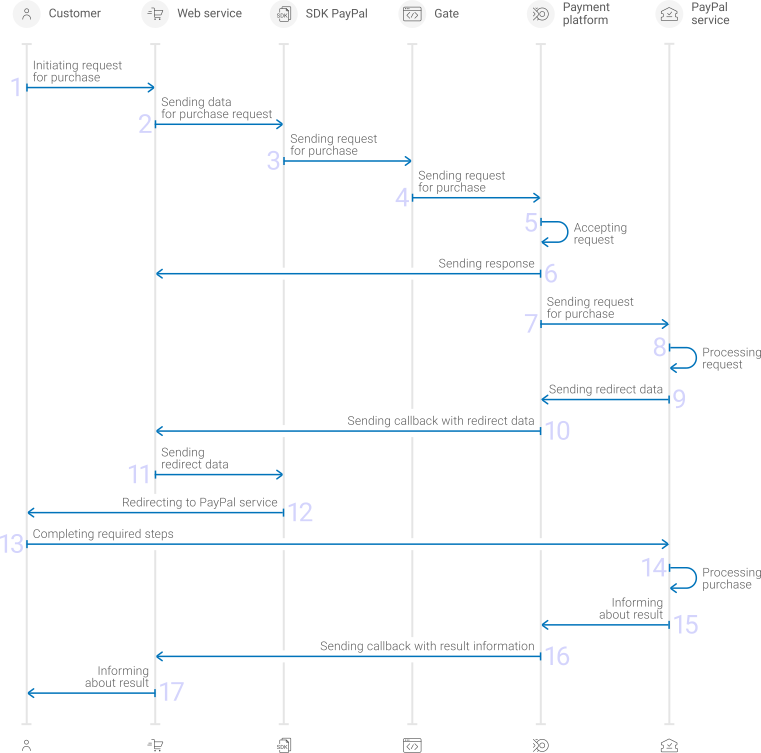
1. A customer initiates a purchase by using the Paypal method in the web service.
2. The web service sends the data for generating the purchase request to the Paypal SDK.
3. The Paypal SDK sends the request for processing the purchase by using Gate to the specified Ecommpay URL.
4. The payment platform receives the request.
5. The payment platform validates the required parameters and signature in the request.
6. The payment platform sends the response to the web service with information about the receipt of the request and its validity \([details](en_gate_interaction_organisation.md)\).
7. The payment platform performs further processing of the request \(with parameter consistency check\) and sends it to the Paypal service.
8. The request is processed on the Paypal service side.
9. The Paypal service sends the redirection data to the payment platform.
10. The payment platform sends the callback with the redirection data to the web service.
11. The web service sends the redirection data to the Paypal SDK.
12. The customer is redirected to the Paypal service by the Paypal SDK.
13. The customer completes all required payment steps.
14. The purchase is processed on the side of the Paypal service.
15. The Paypal service sends the payment result notification to the payment platform.
16. The payment platform sends the payment result callback to the web service.
17. The customer receives the payment result information from the web service.
Information about the formats of requests and callbacks used for processing payments by using the Paypal method via the Paypal SDK and the Gate API is presented further in this section. General information about working with the Gate API is presented in [Interaction concepts](en_gate_interaction_organisation.md).
#### Payment processing by using the Gate API directly {#section_a1v_44t_tyb .section}
To process payments through Gate directly by using the Paypal method, the merchant's web service is required to do the following:
1. Send a request with all the required parameters and signature to the Ecommpay URL.
2. Receive an intermediate callback from the payment platform and redirect the customer to the Paypal service.
3. Receive the final callback from the payment platform.
The full sequence and special aspects of purchase processing are provided below.
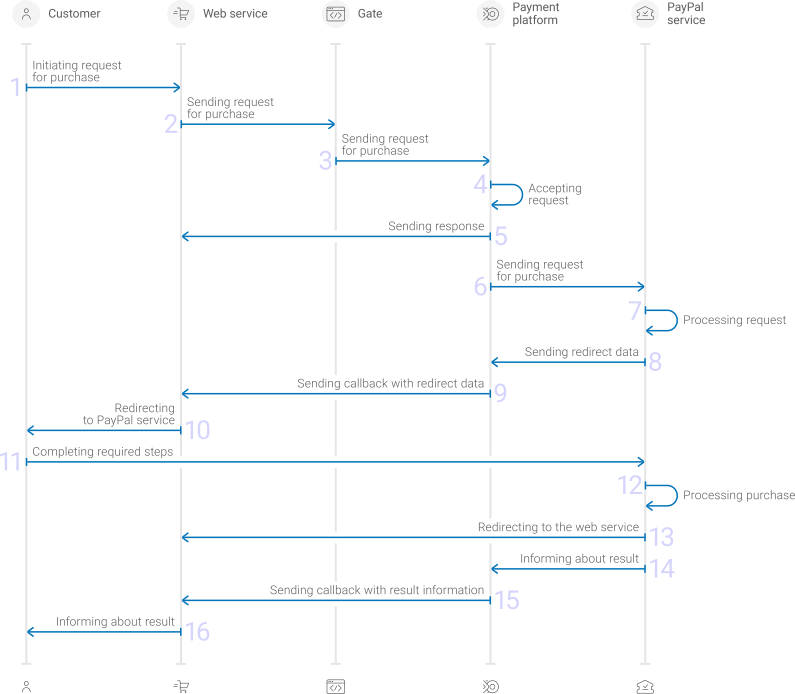
1. A customer initiates a purchase by using the Paypal method in the web service.
2. The web service sends the request for processing the purchase by using Gate to the specified Ecommpay URL.
3. The payment platform receives the request.
4. The payment platform validates the required parameters and signature in the request.
5. The payment platform sends the response to the web service with information about the receipt of the request and its validity \([details](en_gate_interaction_organisation.md)\).
6. The payment platform performs further processing of the request \(with parameter consistency check\) and sends it to the Paypal service.
7. The request is processed on the Paypal service side.
8. The Paypal service sends the redirection data to the payment platform.
9. The payment platform sends the callback with the redirection data to the web service.
10. The customer is redirected to the Paypal service.
11. The customer completes all required payment steps.
12. The purchase is processed on the side of the Paypal service.
13. The customer is redirected to the web service.
14. The Paypal service sends the payment result notification to the payment platform.
15. The payment platform sends the payment result callback to the web service.
16. The customer receives the payment result information from the web service.
Information about the formats of requests and callbacks used for processing payments by using the Paypal method via Gate directly is presented further in this section. General information about working with the Gate API is presented in [Interaction concepts](en_gate_interaction_organisation.md).
### Format of requests for processing of one-step purchases {#en_pm_paypal_gate_purchase_request_format_onestep}
#### Parameters to be specified {#section_osx_3jl_ggb .section}
There are several things you need to consider when sending purchase requests by using the Paypal method:
1. Each request must include the following objects and parameters:
- Object `general`—general purchase information:
- `project_id`—project identifierobtained from Ecommpay during integration
- `payment_id`—payment identifierunique within the project
- `signature`—request signaturegenerated after all required parameters are specified \(details—in the [Signature generation and verification](en_platform_signature.md)\)
- Object `payment`—payment information:
- `amount`—payment amount in the smallest currency unit
- `currency`—payment currency codein the ISO-4217 alpha-3 format
- Object `customer`—customer information:
- `id`—customer identifierunique within the project
- `ip_address`—customer IP addressrelevant for the initiated payment
- Object `return_url`—URLs to which customer is redirected while or after payment processing:
- `success`—URL to redirect the customer to the web service after the customer completes all the required actions on the Paypal service side
- `decline`—URL to redirect the customer to the web service after the customer doesn't complete all the required actions on the Paypal service side
2. Additional parameters can be required depending on the merchant business type \(refer to your Ecommpay key account manager for more information\):
- Object `customer`—customer information:
- `email`—customer email address;
- `first_name`—customer first name;
- `last_name`—customer last name;
- `country`—customer country code in ISO 3166-1 alpha-2 format;
- `phone`—customer phone number;
- Object `additional_data`—additional customer information in the merchant service:
- `sender_create_date`—customer account creation time \(UTC+0\) in ISO 8601 format \(for example `2022-01-25T10:15:30+00:00`\);
- `payments_count`—number of payments made by the merchant's web service for the customer during the previous three months before the payment was initiated;
- `pin_verification`—determines whether the customer's identity for this payment is confirmed using a PIN code \(if yes—`Y` must be specified in the value, if no—`N`\);
- `face_id_verification`—determines whether the customer's identity for this payment is confirmed using a facial recognition system \(if yes—`Y` must be specified in the value, if no—`N`\);
- `additional_verification`—a combination of four indicators that mark the fulfillment of a number of conditions for confirming information about the customer on the web service side in a given sequence. These indicators must be specified in string format, in the specified sequence and without a delimiter. The numbers `0` or `1` should be used as such indicators \(`0`—not confirmed, `1`—confirmed\). The sequence is the following:
1. Phone number confirmation
2. Identifying photo confirmation
3. Payment card confirmation
4. Bank account confirmation
Example: `1101`.
- `ota_type`—OTA \(online travel agency\) type \(for example `Car rental`\)
- `ota_service_start_date`—OTA service start time \(UTC+0\) in ISO 8601 format \(for example `2022-01-25T10:15:30+00:00`\)
- `ota_service_end_date`—OTA service end time \(UTC+0\) in ISO 8601 format \(for example `2022-01-25T10:15:30+00:00`\)
- `ota_change_guest_t_f`—indicates whether the customer is able to be changed \(if yes—`1`, if no—`0`, using string data type\)
- `ota_start_country`—code of the country where the services start to be provided to the customer
- `ota_start_city`—name of the city where the services start to be provided to the customer
- `ota_start_zipcode`—full zip code of the place where the services start to be provided to the customer
3. Additionally, any other parameters included in the specification can be used.
Thus, a correct one-step payment request in the Paypal method must include project and payment IDs, the signature, currency and amount of the purchase, customer information, URLs for redirection and additional information \(if required\).
```language-json
{
"general": {
"project_id": 210,
"payment_id": "test_payment",
"signature": "PJkV8ej\/UG0Di8hTng6JNIipTv+AWoXW\/9MTO8yJA=="
},
"payment": {
"amount": 1000,
"currency": "USD"
},
"customer": {
"ip_address": "192.0.2.0",
"id": "123"
},
"additional_data": {
"sender_create_date": "2022-01-25T10:15:30+00:00",
"payments_count": "123",
"pin_verification": "Y",
"face_id_verification": "N",
"additional_verification": "1101",
"ota_type": "Car rental",
"ota_service_start_date": "2022-01-26T10:15:30+00:00",
"ota_service_end_date": "2022-02-25T10:15:30+00:00",
"ota_change_guest_t_f": "0",
"ota_start_country": "US",
"ota_start_city": "Dallas",
"ota_start_zipcode": "12345"
},
"return_url": {
"success": "http://example.com/success",
"decline": "http://example.com/decline"
}
}
```
#### Sending requests by using the Paypal SDK and the Gate API API {#section_lwm_cst_tyb .section}
When sending requests by using the Paypal SDK and the Gate API it is necessary that these requests correspond to the format supported by the Paypal SDK. To initiate each purchase send a separate POST request to the `/v2/payment/wallet/paypal/sale` endpoint.
As an example, the implementation of the request sending function may look like the following.
```language-javascript
const test = {
createOrder: function (data) {
return fetch('https://api.ecommpay.com/v2/payment/wallet/paypal/sale', {
method: 'POST',
body: JSON.stringify(data),
});
},
};
test.createOrder({ project_id: 123, payment_amount: '10000', ... })
```
#### Sending requests by using the Gate API directly {#section_iwt_cst_tyb .section}
To initiate each purchase, send a separate POST request to the `/v2/payment/wallet/paypal/sale` endpoint. This endpoint belongs to the group [/v2/payment/wallet/\{payment\_method\}/sale](https://api-developers.ecommpay.com/api-specification/wallet/post-v2-payment-wallet-payment-method-sale).
### Format of requests for authorization hold {#en_pm_paypal_gate_purchase_request_format_auth}
#### Parameters to be specified {#section_hwb_tsf_1zb .section}
There are several things you need to consider when sending authorization hold requests by using the Paypal method:
1. Each request must include the following objects and parameters:
- Object `general`—general purchase information:
- `project_id`—project identifierobtained from Ecommpay during integration
- `payment_id`—payment identifierunique within the project
- `signature`—request signaturegenerated after all required parameters are specified \(details—in the [Signature generation and verification](en_platform_signature.md)\)
- Object `payment`—payment information:
- `amount`—payment amount in the smallest currency unit
- `currency`—payment currency codein the ISO-4217 alpha-3 format
- Object `customer`—customer information:
- `id`—customer identifierunique within the project
- `ip_address`—customer IP addressrelevant for the initiated payment
- Object `return_url`—the URLs to which customer is redirected while or after payment processing:
- `return`—URL for redirecting a customer during any step of the purchase.
2. Additional parameters can be required depending on the merchant business type \(refer to your Ecommpay key account manager for more information\):
- Object `customer`—customer information:
- `email`—customer email address;
- `first_name`—customer first name;
- `last_name`—customer last name;
- `country`—customer country code in ISO 3166-1 alpha-2 format;
- `phone`—customer phone number;
- Object `additional_data`—additional customer information in the merchant service:
- `sender_create_date`—customer account creation time \(UTC+0\) in ISO 8601 format \(for example `2022-01-25T10:15:30+00:00`\);
- `payments_count`—number of payments made by the merchant's web service for the customer during the previous three months before the payment was initiated;
- `pin_verification`—determines whether the customer's identity for this payment is confirmed using a PIN code \(if yes—`Y` must be specified in the value, if no—`N`\);
- `face_id_verification`—determines whether the customer's identity for this payment is confirmed using a facial recognition system \(if yes—`Y` must be specified in the value, if no—`N`\);
- `additional_verification`—a combination of four indicators that mark the fulfillment of a number of conditions for confirming information about the customer on the web service side in a given sequence. These indicators must be specified in string format, in the specified sequence and without a delimiter. The numbers `0` or `1` should be used as such indicators \(`0`—not confirmed, `1`—confirmed\). The sequence is the following:
1. Phone number confirmation
2. Identifying photo confirmation
3. Payment card confirmation
4. Bank account confirmation
Example: `1101`.
- `ota_type`—OTA \(online travel agency\) type \(for example `Car rental`\)
- `ota_service_start_date`—OTA service start time \(UTC+0\) in ISO 8601 format \(for example `2022-01-25T10:15:30+00:00`\)
- `ota_service_end_date`—OTA service end time \(UTC+0\) in ISO 8601 format \(for example `2022-01-25T10:15:30+00:00`\)
- `ota_change_guest_t_f`—indicates whether the customer is able to be changed \(if yes—`1`, if no—`0`, using string data type\)
- `ota_start_country`—code of the country where the services start to be provided to the customer
- `ota_start_city`—name of the city where the services start to be provided to the customer
- `ota_start_zipcode`—full zip code of the place where the services start to be provided to the customer
3. Additionally, any other parameters included in the specification can be used.
A correct authorization hold request in the Paypal method must include project and payment IDs, the signature, currency and amount of the purchase, customer information, URL for redirection and additional information \(if required\).
```language-json
{
"general": {
"project_id": 210,
"payment_id": "test_payment",
"signature": "PJkV8ej\/UG0Di8hTng6JIipTv+AWoXW\/9MTO8yJA=="
},
"payment": {
"amount": 1000,
"currency": "USD"
},
"customer": {
"ip_address": "192.0.2.0",
"id": "customer123",
"email": "test@example.com",
"first_name": "John",
"last_name": "Doe",
"phone": "3572437356",
"country": "GB"
},
"additional_data": {
"sender_create_date": "2022-01-25T10:15:30+00:00",
"payments_count": "123",
"pin_verification": "Y",
"face_id_verification": "N",
"additional_verification": "1101",
"ota_type": "Car rental",
"ota_service_start_date": "2022-01-26T10:15:30+00:00",
"ota_service_end_date": "2022-02-25T10:15:30+00:00",
"ota_change_guest_t_f": "0",
"ota_start_country": "US",
"ota_start_city": "Dallas",
"ota_start_zipcode": "12345"
},
"return_url": {
"return": "http://example.com/return"
}
}
```
#### Sending requests by using the Paypal SDK and the Gate API {#section_lwm_cst_tyb .section}
When sending requests by using the Paypal SDK and the Gate API it is necessary that these requests correspond to the format supported by the Paypal SDK. To initiate each purchase send a separate POST request to the `/v2/payment/wallet/paypal/auth` endpoint.
As an example, the implementation of the request sending function may look like the following.
```language-javascript
const test = {
createOrder: function (data) {
return fetch('https://api.ecommpay.com/v2/payment/wallet/paypal/auth, {
method: 'POST',
body: JSON.stringify(data),
});
},
};
test.createOrder({ project_id: 123, payment_amount: '10000', ... })
```
#### Sending requests by using the Gate API directly {#section_iwt_cst_tyb .section}
To initiate each purchase, send a separate POST request to the `/v2/payment/wallet/paypal/auth` endpoint. This endpoint belongs to the group [/v2/payment/wallet/\{payment\_method\}/auth](https://api-developers.ecommpay.com/api-specification/wallet/post-v2-payment-wallet-payment-method-auth).
### Format of requests for debiting of authorized amount {#en_pm_paypal_gate_purchase_request_format_capture}
There are several things you must consider when sending debiting requests by using the Paypal method:
1. To initiate each debiting of funds, send a separate POST request to the `/v2/payment/wallet/paypal/capture` endpoint \(belongs to the group [/v2/payment/wallet/\{payment\_method\}/capture](https://api-developers.ecommpay.com/api-specification/wallet/post-v2-payment-wallet-payment-method-capture)\).
2. Each request must include the following objects and parameters:
- Object `general`—general purchase information:
- `project_id`—project identifierobtained from Ecommpay during integration
- `payment_id`—payment identifierunique within the project
- `signature`—request signaturegenerated after all required parameters are specified \(details—in the [Signature generation and verification](en_platform_signature.md)\)
3. Additionally, any other parameters included in the specification can be used.
Thus, a correct debiting request by using the Paypal method must include project and payment IDs, as well as signature.
```language-json
{
"general": {
"project_id": 580,
"payment_id": "TEST_15427033321774",
"signature": "96c+hWk1zweuGKwDRrl+Se5mDLXHChlDZrjJXZw7ew6ow3RpGYv4U...=="
}
```
### Format of requests for release of authorized amount {#en_pm_paypal_gate_purchase_request_format_cancel}
There are several things you must consider when sending release requests by using the Paypal method:
1. To initiate each release, send a separate POST request to the `/v2/payment/wallet/paypal/cancel` endpoint \(belongs to the group [/v2/payment/wallet/\{payment\_method\}/cancel](https://api-developers.ecommpay.com/api-specification/wallet/post-v2-payment-wallet-payment-method-cancel)\).
2. Each request must include the following objects and parameters:
- Object `general`—general purchase information:
- `project_id`—project identifierobtained from Ecommpay during integration
- `payment_id`—payment identifierunique within the project
- `signature`—request signaturegenerated after all required parameters are specified \(details—in the [Signature generation and verification](en_platform_signature.md)\)
3. Additionally, any other parameters included in the specification can be used.
Thus, a correct release request by using the Paypal method must include project and payment IDs, and signature.
```language-json
{
"general": {
"project_id": 580,
"payment_id": "TEST_15427033321774",
"signature": "96c+hWk1zweuGKwDRrl+Se5mDLXHChlDZrjJXZw7ew6ow3RpGY=="
}
```
### Formats of intermediate callbacks for customer redirection {#en_pm_paypal_gate_purchase_redirection}
#### Data format when using the Paypal SDK and the Gate API {#section_lnb_k5t_tyb .section}
Each payment made with the Paypal method requires redirection of customers from the merchant's web service to the Paypal service. To redirect a customer it is necessary to receive an intermediate callback from the payment platform and use the order identifier on the Paypal service side \(`orderID`\) in accordance with [the official documentation](https://developer.paypal.com/docs/checkout/save-payment-methods/during-purchase/js-sdk/paypal/#link-createorder). This identifier is specified in the `payment_id` parameter of the `provider` object included in the `operation` object.The format of intermediate callbacks is standard \([details](en_platform_callbacks.md)\).
```language-json
"operation": {
"sum_initial": {
"amount": 50000,
"currency": "USD"
},
"sum_converted": {
"amount": 50000,
"currency": "USD"
},
"code": "9999",
"message": "Awaiting processing",
"provider": {
"id": 1556,
"payment_id": "14C27062M77937123",
"auth_code": ""
}
```
#### Data format when using the Gate API directly {#section_tql_k5t_tyb .section}
Each payment made with the Paypal method requires redirection of customers from the merchant's web service to the Paypal service. To redirect a customer it is necessary to receive an intermediate callback from the payment platform and use the information included in the `redirect_data` object. The format of such callbacks is standard \([details](en_platform_callbacks.md)\), and the following objects and parameters are included in the `redirect_data` object:
- `body`—object with data to be sent in the request body
- `method`—parameter specifying the HTTP method for sending the request \(`GET` or `POST`\)
- `url`—parameter containing a link for redirection
```language-json
"redirect_data": {
"body": {},
"method": "GET",
"url": "https://www.example.com/pay"
}
```
### Callback format {#en_pm_paypal_gate_purchase_callback_format}
The Paypal method uses the standard format for callbacks to deliver purchase results. For more information, see [Handling callbacks](en_platform_callbacks.md).
The following is the example of a callback with an information about a `10.00 USD` one-step purchase in the `210` project.
```language-json
{
"project_id": 210,
"payment": {
"id": "test_payment_1",
"type": "purchase",
"status": "success",
"date": "2019-12-25T09:48:29+0000",
"method": "PayPal Wallet",
"sum": {
"amount": 1000,
"currency": "USD"
},
"description": ""
},
"account": {
"number": "ABCDEFG123456"
},
"provider_extra_fields": {
"holder": "John Doe",
"email": "customer@example.com"
},
"customer": {
"id": "7895623"
},
"operation": {
"id": 63460000012251,
"type": "sale",
"status": "success",
"date": "2019-12-25T09:48:29+0000",
"created_date": "2019-12-25T09:47:54+0000",
"request_id": "55aa73dcab36da37f3a4eeb72f7-00063461",
"sum_initial": {
"amount": 1000,
"currency": "USD"
},
"sum_converted": {
"amount": 1000,
"currency": "USD"
},
"code": "0",
"message": "Success",
"provider": {
"id": 1556,
"payment_id": "14C27062M77937123",
"auth_code": "",
"date": "2019-12-25T09:48:27+0000"
}
},
"signature": "bLraFo85nUfpfn...VhVkMyximHVkuL3THI1oHRkukafnk3A=="
}
```
The following is the example of a callback with information about a declined purchase.
```language-json
{
"project_id": 210,
"payment": {
"id": "test_payment_2",
"type": "purchase",
"status": "decline",
"date": "2019-12-18T09:00:07+0000",
"method": "PayPal Wallet",
"sum": {
"amount": 900,
"currency": "USD"
},
"description": "test_paypal"
},
"customer": {
"id": "156787"
},
"operation": {
"id": 55628000009581,
"type": "sale",
"status": "decline",
"date": "2019-12-18T09:00:07+0000",
"created_date": "2019-12-18T08:59:30+0000",
"request_id": "b8d98d70def1762f52dc00ffb6-00055629",
"sum_initial": {
"amount": 900,
"currency": "USD"
},
"sum_converted": {
"amount": 900,
"currency": "USD"
},
"code": "20000",
"message": "General decline",
"provider": {
"id": 1556,
"payment_id": "",
"auth_code": ""
}
},
"signature": "OEDB1GoxL9wsMnrP2S...TOaeW5qen7MrDC2o3Rg=="
}
```
The following is an example of a callback with the information about the `100,00 USD` authorisation hold in the `1037` project.
```language-json
{
"project_id": 1037,
"payment": {
"id": "62153051",
"type": "purchase",
"status": "awaiting capture",
"date": "2021-12-15T13:04:15+0000",
"method": "PayPal Wallet",
"sum": {
"amount": 10000,
"currency": "USD"
},
"description": "Test sale"
},
"account": {
"number": "ABCDEFG123456"
},
"customer": {
"id": "123"
},
"provider_extra_fields": {
"holder": "John Doe",
"email": "customer@example.com"
},
"operation": {
"id": 62,
"type": "auth",
"status": "success",
"date": "2021-12-15T13:04:15+0000",
"created_date": "2021-12-15T13:03:24+0000",
"request_id": "363dedea310b7e3e35-00000001",
"sum_initial": {
"amount": 10000,
"currency": "USD"
},
"sum_converted": {
"amount": 10000,
"currency": "USD"
},
"code": "0",
"message": "Success",
"provider": {
"id": 1782,
"payment_id": "33007291SS518890B",
"auth_code": "",
"date": "2021-12-15T13:04:12+0000"
}
},
"signature": "AAB6/UB0MJY+O/h11NfFIsO6WXRzCSnJDPXYg=="
}
```
The following is the example of a callback for a declined authorisation hold request.
```language-json
{
"project_id": 1037,
"payment": {
"id": "87764079",
"type": "purchase",
"status": "decline",
"date": "2021-12-15T13:21:51+0000",
"method": "PayPal Wallet",
"sum": {
"amount": 10000,
"currency": "EUR"
},
"description": "Test sale"
},
"customer": {
"id": "123"
},
"operation": {
"id": 67,
"type": "auth",
"status": "decline",
"date": "2021-12-15T13:21:51+0000",
"created_date": "2021-12-15T13:21:39+0000",
"request_id": "982fc18ec86c925d88-00000001",
"sum_initial": {
"amount": 10000,
"currency": "EUR"
},
"sum_converted": {
"amount": 10000,
"currency": "EUR"
},
"code": "20000",
"message": "General decline",
"provider": {
"id": 1782,
"payment_id": "",
"auth_code": ""
}
},
"signature": "zZBZHvDTIKG1+SdwLGW642i03JQL238wkmhcLcg=="
}
```
The following is the example of a callback with the information about the debiting of `100,00 EUR` in the `1037` project.
```language-json
{
"project_id": 1037,
"payment": {
"id": "62153051",
"type": "purchase",
"status": "success",
"date": "2021-12-15T13:05:00+0000",
"method": "PayPal Wallet",
"sum": {
"amount": 10000,
"currency": "EUR"
},
"description": "Test sale"
},
"account": {
"number": "ABCDEFG123456"
},
"customer": {
"id": "1234"
},
"operation": {
"id": 63,
"type": "capture",
"status": "success",
"date": "2021-12-15T13:05:00+0000",
"created_date": "2021-12-15T13:04:50+0000",
"request_id": "ea2e5888a65cf1b1f2b5-00000001",
"sum_initial": {
"amount": 10000,
"currency": "EUR"
},
"sum_converted": {
"amount": 10000,
"currency": "EUR"
},
"code": "0",
"message": "Success",
"provider": {
"id": 1782,
"payment_id": "7C035795EJ562523A",
"auth_code": "",
"date": "2021-12-15T13:04:57+0000"
}
},
"signature": "uU6LOpEjEqxeqJ2GsDkDnaY+1p1m4aS5zTPkJA=="
}
```
The following is the example of a callback with the information about a declined debiting of funds.
```language-json
{
"project_id": 1037,
"payment": {
"id": "59375393",
"type": "purchase",
"status": "awaiting capture",
"date": "2021-12-15T14:29:38+0000",
"method": "PayPal Wallet",
"sum": {
"amount": 100000,
"currency": "EUR"
},
"description": "Test sale"
},
"account": {
"number": "ABCDEFG123456"
},
"customer": {
"id": "1234"
},
"operation": {
"id": 84,
"type": "capture",
"status": "decline",
"date": "2021-12-15T14:29:38+0000",
"created_date": "2021-12-15T14:29:31+0000",
"request_id": "776d5d3e602912e88858c922e34e5-00000001",
"sum_initial": {
"amount": 100000,
"currency": "EUR"
},
"sum_converted": {
"amount": 100000,
"currency": "USD"
},
"code": "20000",
"message": "General decline",
"provider": {
"id": 1782,
"payment_id": "",
"auth_code": ""
}
},
"signature": "qjVnKRZX51lrxh5kqCzurbJbQQSAeFwqH7H9gk7gUYI3A=="
}
```
The following is the example of a callback with the information about the cancelling of the `140,00 EUR` authorisation hold in the `1037` project.
```language-json
{
"project_id": 1037,
"payment": {
"id": "34121156",
"type": "purchase",
"status": "canceled",
"date": "2021-12-15T13:13:43+0000",
"method": "PayPal Wallet",
"sum": {
"amount": 10400,
"currency": "EUR"
},
"description": "Test sale"
},
"account": {
"number": "ABCDEFG123456"
},
"customer": {
"id": "54356"
},
"operation": {
"id": 65,
"type": "cancel",
"status": "success",
"date": "2021-12-15T13:13:43+0000",
"created_date": "2021-12-15T13:13:31+0000",
"request_id": "93a233b6e894b9c75b04376500459-00000001",
"sum_initial": {
"amount": 10400,
"currency": "EUR"
},
"sum_converted": {
"amount": 10400,
"currency": "EUR"
},
"code": "0",
"message": "Success",
"provider": {
"id": 1782,
"payment_id": "83M31576986944942",
"auth_code": "",
"date": "2021-12-15T13:13:39+0000"
}
},
"signature": "sxsHVGlOb0edv7HDMoW0KUB+PIrMns8/94pr17g=="
}
```
The following is the example of a callback for declined cancelling of an authorisation hold.
```language-json
{
"project_id": 1037,
"payment": {
"id": "24594739",
"type": "purchase",
"status": "awaiting capture",
"date": "2021-12-15T14:18:06+0000",
"method": "PayPal Wallet",
"sum": {
"amount": 100000,
"currency": "EUR"
},
"description": "Test sale"
},
"account": {
"number": "ABCDEFG123456"
},
"customer": {
"id": "134"
},
"operation": {
"id": 81,
"type": "cancel",
"status": "decline",
"date": "2021-12-15T14:18:06+0000",
"created_date": "2021-12-15T14:17:58+0000",
"request_id": "c5aa36c9134a1c629a23121add6-00000001",
"sum_initial": {
"amount": 100000,
"currency": "EUR"
},
"sum_converted": {
"amount": 100000,
"currency": "EUR"
},
"code": "20000",
"message": "General decline",
"provider": {
"id": 1782,
"payment_id": "",
"auth_code": ""
}
},
"signature": "PZBiCA2ZFxnLw2SxfL+WnePV1m1zFY0Ys8vbz1g=="
}
```
### Useful links {#en_pm_paypal_gate_purchase_useful_links}
The following articles can be useful when implementing purchases via Gate:
- [Interaction concepts](en_gate_interaction_organisation.md)—about the interaction with the payment platform by using Gate.
- [Signature generation and verification](en_platform_signature.md)—about the procedure of generating and verifying signatures in requests and callbacks.
- [Payment processing](en_platform_payment_model.md)—about the types, processing models, and possible statuses of supported payments and operations.
- [One-time one-step purchase](en_platform_sms_model.md)—about processing of one-time one-step purchases by using Gate.
- [Handling operation processing information](en_platform_payment_info_codes.md)—about error and response codes that are used in the payment platform to record information about performing of operations.
## COF purchases by using Gate {#en_pm_paypal_gate_recurring}
### General information {#section_lsx_3jl_ggb .section}
The Paypal payment method provides the ability to perform COF purchases—regular on-demand payments. For more information about COF purchases, see [On-demand COF purchase](en_platform_recurring_model.md) and [COF purchase with automatic debiting](en_platform_sheduled_recurring_model.md).
Information about the formats of requests and callbacks used for processing payments by using the Paypal method via Gate is presented further in this section. General information about working with the Gate API is presented in [Interaction concepts](en_gate_interaction_organisation.md).
### COF purchase registration {#section_qhf_wsn_j3b .section}
To register a COF purchase by using Gate, the merchant is required to send a request for purchase with all the required parameters \(including the `register` parameter of the `recurring` object, set to the value `true`\) to the Ecommpay URL and get the callback with the payment result from the payment platform. To register a regular payment the request should also contain information about the frequency, amount, start and end dates of regular payments. The COF purchase registration callback contains its identifier, which can be used to process or cancel regular payments.
For more information about purchase processing by using Gate, see [One-time purchases by using Gate](pm_paypal.md).
### Format of requests for registration of COF purchases when processing of one-time one-step purchases {#section_osx_3jl_ggb .section}
There are several things you need to consider when sending requests for registering COF purchases via processing of one-time one-step purchases:
1. To register each COF purchase, send a separate POST request to the `/v2/payment/wallet/paypal/sale` endpoint, which belongs to the group [/v2/payment/wallet/\{payment\_method\}/sale](https://api-developers.ecommpay.com/api-specification/wallet/post-v2-payment-wallet-payment-method-sale).
2. Each request must include the following objects and parameters:
- Object `general`—general purchase information:
- `project_id`—project identifierobtained from Ecommpay during integration
- `payment_id`—payment identifierunique within the project
- `signature`—request signaturegenerated after all required parameters are specified \(details—in the [Signature generation and verification](en_platform_signature.md)\)
- Object `payment`—payment information:
- `amount`—payment amount in the smallest currency unit
- `currency`—payment currency codein the ISO-4217 alpha-3 format
- Object `customer`—customer information:
- `id`—customer identifierunique within the project
- `ip_address`—customer IP addressrelevant for the initiated payment
- Object `return_url`—URLs to which customer is redirected while or after payment processing:
- `success`—URL to redirect the customer to the web service after the customer completes all the required actions on the Paypal service side
- `decline`—URL to redirect the customer to the web service after the customer doesn't complete all the required actions on the Paypal service side
- Object `recurring`—COF purchase information:
- `register`—indicator that specifies whether a COF purchase should be registered
- `type`—type of the COF purchase: `R` \(for Regular payment\) or `U` \(for Autopayment\), for more information, refer to [Overview](en_Gate__saved_cards_payments_type.md)
- `period`—frequency of debits \(for a regular COF purchase\)
- `interval`— multiplier to increase debiting frequency \(i.e. the interval of performing regular COF purchases\)
- `time`—time of performing subsequent debits \(for a regular COF purchase\) in the `hh:mm:ss (UTC0)` format
- `start_date`—date on which the first debit operation is performed \(must be at least one day later than the date of registration\)
- `amount`—fixed amount of subsequent debits in the smallest currency unit
- `scheduled_payment_id`—identifier assigned to the payment within which scheduled debits are performed, it must differ from the identifier of the payment made to register a COF purchase and must be unique within the project
3. Additional parameters can be required depending on the merchant business type \(refer to your Ecommpay key account manager for more information\):
- Object `customer`—customer information:
- `email`—customer email address;
- `first_name`—customer first name;
- `last_name`—customer last name;
- `country`—customer country code in ISO 3166-1 alpha-2 format;
- `phone`—customer phone number;
- Object `additional_data`—additional customer information in the merchant service:
- `sender_create_date`—customer account creation time \(UTC+0\) in ISO 8601 format \(for example `2022-01-25T10:15:30+00:00`\);
- `payments_count`—number of payments made by the merchant's web service for the customer during the previous three months before the payment was initiated;
- `pin_verification`—determines whether the customer's identity for this payment is confirmed using a PIN code \(if yes—`Y` must be specified in the value, if no—`N`\);
- `face_id_verification`—determines whether the customer's identity for this payment is confirmed using a facial recognition system \(if yes—`Y` must be specified in the value, if no—`N`\);
- `additional_verification`—a combination of four indicators that mark the fulfillment of a number of conditions for confirming information about the customer on the web service side in a given sequence. These indicators must be specified in string format, in the specified sequence and without a delimiter. The numbers `0` or `1` should be used as such indicators \(`0`—not confirmed, `1`—confirmed\). The sequence is the following:
1. Phone number confirmation
2. Identifying photo confirmation
3. Payment card confirmation
4. Bank account confirmation
Example: `1101`.
- `ota_type`—OTA \(online travel agency\) type \(for example `Car rental`\)
- `ota_service_start_date`—OTA service start time \(UTC+0\) in ISO 8601 format \(for example `2022-01-25T10:15:30+00:00`\)
- `ota_service_end_date`—OTA service end time \(UTC+0\) in ISO 8601 format \(for example `2022-01-25T10:15:30+00:00`\)
- `ota_change_guest_t_f`—indicates whether the customer is able to be changed \(if yes—`1`, if no—`0`, using string data type\)
- `ota_start_country`—code of the country where the services start to be provided to the customer
- `ota_start_city`—name of the city where the services start to be provided to the customer
- `ota_start_zipcode`—full zip code of the place where the services start to be provided to the customer
4. Additionally, any other parameters included in the specification can be used.
Thus, a correct COF purchase registration request by using the Paypal method must contain the project identifier, basic payment information \(identifier, amount, and currency code\), customer information, URLs for redirection, the registration parameter and the conditions for regular payments, as well as signature.
``` {#codeblock_std_hhl_5dc .language-json}
{
"general": {
"project_id": 208,
"payment_id": "TEST_15427007172789",
"signature": "DH0v2pZnkK9hwytQSkzd0Iq6lM2...==",
},
"customer": {
"id": "123",
"ip_address": "192.0.2.0"
},
"payment": {
"amount": 1000,
"currency": "USD",
"email": "test@example.com",
"first_name": "John",
"last_name": "Doe",
"phone": "3572437356",
"country": "US"
},
"additional_data": {
"sender_create_date": "2022-01-25T10:15:30+00:00",
"payments_count": "123",
"pin_verification": "Y",
"face_id_verification": "N",
"additional_verification": "1101",
"ota_type": "Car rental",
"ota_service_start_date": "2022-01-26T10:15:30+00:00",
"ota_service_end_date": "2022-02-25T10:15:30+00:00",
"ota_change_guest_t_f": "0",
"ota_start_country": "US",
"ota_start_city": "Dallas",
"ota_start_zipcode": "12345"
},
"return_url": {
"success": "http://example.com/success",
"decline": "http://example.com/decline"
},
"recurring": {
"register": true,
"type": "R",
"amount": 1000,
"interval": 1,
"cycle": "week",
"start_date": "21-11-2018"
}
}
```
### Format of requests for registration of COF purchases when processing of one-time two-step purchases {#section_yxr_l25_cbc .section}
There are several things you need to consider when sending requests for registering COF purchases via processing of one-time two-step purchases:
1. To register each COF purchase, send a separate POST request to the `/v2/payment/wallet/paypal/auth` endpoint, which belongs to the group [/v2/payment/wallet/\{payment\_method\}/auth](https://api-developers.ecommpay.com/api-specification/wallet/post-v2-payment-wallet-payment-method-auth).
2. Each request must include the following objects and parameters:
- Object `general`—general purchase information:
- `project_id`—project identifierobtained from Ecommpay during integration
- `payment_id`—payment identifierunique within the project
- `signature`—request signaturegenerated after all required parameters are specified \(details—in the [Signature generation and verification](en_platform_signature.md)\)
- Object `payment`—payment information:
- `amount`—payment amount in the smallest currency unit
- `currency`—payment currency codein the ISO-4217 alpha-3 format
- Object `customer`—customer information:
- `id`—customer identifierunique within the project
- `ip_address`—customer IP addressrelevant for the initiated payment
- Object `return_url`—the URLs to which customer is redirected while or after payment processing:
- `return`—URL for redirecting a customer during any step of the purchase.
- Object `recurring`—COF purchase information:
- `register`—indicator that specifies whether a COF purchase should be registered
- `type`—type of the COF purchase to register: `R` \(for Regular payment\) or `U` \(for Autopayment\), for more information, refer to [Overview](en_Gate__saved_cards_payments_type.md)
- `period`—frequency of debits \(for a regular COF purchase\)
- `interval`—multiplier to increase debiting frequency \(i.e. the interval of performing regular COF purchases\)
- `start_date`—date on which the first debit operation is performed, in the `DD-MM-YYYY` format \(must be at least one day later than the date of registration\)
- `amount`—fixed amount of subsequent debits \(for a regular COF purchase\) in the smallest currency unit
- `time`—time of performing subsequent debits \(for a regular COF purchase\) in the `hh:mm:ss (UTC0)`
- `scheduled_payment_id`—identifier of the next COF purchase
3. Depending on the merchant business type, to improve payment acceptance rate, it may be relevant to specify the following parameters \(partially or completely; information on parameters recommended in specific cases can be clarified with the Ecommpay account manager\):
- Object `customer`—customer information:
- `email`—customer email address;
- `first_name`—customer first name;
- `last_name`—customer last name;
- `country`—customer country code in ISO 3166-1 alpha-2 format;
- `phone`—customer phone number;
- Object `additional_data`—additional customer information in the merchant service:
- `sender_create_date`—customer account creation time \(UTC+0\) in ISO 8601 format \(for example `2022-01-25T10:15:30+00:00`\);
- `payments_count`—number of payments made by the merchant's web service for the customer during the previous three months before the payment was initiated;
- `pin_verification`—determines whether the customer's identity for this payment is confirmed using a PIN code \(if yes—`Y` must be specified in the value, if no—`N`\);
- `face_id_verification`—determines whether the customer's identity for this payment is confirmed using a facial recognition system \(if yes—`Y` must be specified in the value, if no—`N`\);
- `additional_verification`—a combination of four indicators that mark the fulfillment of a number of conditions for confirming information about the customer on the web service side in a given sequence. These indicators must be specified in string format, in the specified sequence and without a delimiter. The numbers `0` or `1` should be used as such indicators \(`0`—not confirmed, `1`—confirmed\). The sequence is the following:
1. Phone number confirmation
2. Identifying photo confirmation
3. Payment card confirmation
4. Bank account confirmation
Example: `1101`.
- `ota_type`—OTA \(online travel agency\) type \(for example `Car rental`\)
- `ota_service_start_date`—OTA service start time \(UTC+0\) in ISO 8601 format \(for example `2022-01-25T10:15:30+00:00`\)
- `ota_service_end_date`—OTA service end time \(UTC+0\) in ISO 8601 format \(for example `2022-01-25T10:15:30+00:00`\)
- `ota_change_guest_t_f`—indicates whether the customer is able to be changed \(if yes—`1`, if no—`0`, using string data type\)
- `ota_start_country`—code of the country where the services start to be provided to the customer
- `ota_start_city`—name of the city where the services start to be provided to the customer
- `ota_start_zipcode`—full zip code of the place where the services start to be provided to the customer
4. Additionally, any other parameters included in the specification can be used.
Thus, a correct COF purchase registration request by using the Paypal method must contain the project identifier, basic payment information \(identifier, amount, and currency code\), customer information, URL for redirection, the registration parameter and the conditions for regular payments, as well as signature.
``` {#codeblock_rql_khl_5dc .language-json}
{
"general": {
"project_id": 210,
"payment_id": "test_payment",
"signature": "PJkV8ej\/UG0Di8hTng6JIipTv+AWoXW\/9MTO8yJA=="
},
"payment": {
"amount": 1000,
"currency": "USD"
},
"customer": {
"ip_address": "192.0.2.0",
"id": "customer123",
"email": "test@example.com",
"first_name": "John",
"last_name": "Doe",
"phone": "3572437356",
"country": "US"
},
"additional_data": {
"sender_create_date": "2022-01-25T10:15:30+00:00",
"payments_count": "123",
"pin_verification": "Y",
"face_id_verification": "N",
"additional_verification": "1101",
"ota_type": "Car rental",
"ota_service_start_date": "2022-01-26T10:15:30+00:00",
"ota_service_end_date": "2022-02-25T10:15:30+00:00",
"ota_change_guest_t_f": "0",
"ota_start_country": "US",
"ota_start_city": "Dallas",
"ota_start_zipcode": "12345"
},
"return_url": {
"return": "http://example.com/return"
},
"recurring": {
"register": true,
"type": "R",
"amount": 1000,
"interval": 1,
"cycle": "week",
"start_date": "21-11-2018"
}
}
```
### Format of requests for COF purchase processing {#section_isb_3xn_j3b .section}
After the payment is registered, the funds are debited according to the specified regular payment conditions. You initiate COF purchase by sending a `recurring` request to the payment platform.
There are several things you must consider when processing COF purchases performing by using the Paypal method:
1. To process each purchase, send a separate POST request to the `/v2/payment/wallet/paypal/recurring` endpoint, which belongs to the group [/v2/payment/wallet/\{payment\_method\}/recurring](https://api-developers.ecommpay.com/api-specification/wallet/post-v2-payment-wallet-payment-method-recurring).
2. Each request must include the following objects and parameters:
- Object `general`—general purchase information:
- `project_id`—project identifierobtained from Ecommpay during integration
- `payment_id`—payment identifierunique within the project
- `signature`—request signaturegenerated after all required parameters are specified \(details—in the [Signature generation and verification](en_platform_signature.md)\)
- Object `payment`—payment information:
- `amount`—payment amount in the smallest currency unit
- `currency`—payment currency codein the ISO-4217 alpha-3 format
- Object `customer`—customer information:
- `ip_address`—customer IP addressrelevant for the initiated payment
- Object `recurring`—COF purchase information:
- `id`—registered COF purchase identifier
3. Depending on the merchant business type, to improve payment acceptance rate, it may be relevant to specify the following parameters \(partially or completely; information on parameters recommended in specific cases can be clarified with the Ecommpay account manager\):
- Object `customer`—customer information:
- `email`—customer email address;
- `first_name`—customer first name;
- `last_name`—customer last name;
- `country`—customer country code in ISO 3166-1 alpha-2 format;
- `phone`—customer phone number;
- Object `additional_data`—additional customer information in the merchant service:
- `sender_create_date`—customer account creation time \(UTC+0\) in ISO 8601 format \(for example `2022-01-25T10:15:30+00:00`\);
- `payments_count`—number of payments made by the merchant's web service for the customer during the previous three months before the payment was initiated;
- `pin_verification`—determines whether the customer's identity for this payment is confirmed using a PIN code \(if yes—`Y` must be specified in the value, if no—`N`\);
- `face_id_verification`—determines whether the customer's identity for this payment is confirmed using a facial recognition system \(if yes—`Y` must be specified in the value, if no—`N`\);
- `additional_verification`—a combination of four indicators that mark the fulfillment of a number of conditions for confirming information about the customer on the web service side in a given sequence. These indicators must be specified in string format, in the specified sequence and without a delimiter. The numbers `0` or `1` should be used as such indicators \(`0`—not confirmed, `1`—confirmed\). The sequence is the following:
1. Phone number confirmation
2. Identifying photo confirmation
3. Payment card confirmation
4. Bank account confirmation
Example: `1101`.
- `ota_type`—OTA \(online travel agency\) type \(for example `Car rental`\)
- `ota_service_start_date`—OTA service start time \(UTC+0\) in ISO 8601 format \(for example `2022-01-25T10:15:30+00:00`\)
- `ota_service_end_date`—OTA service end time \(UTC+0\) in ISO 8601 format \(for example `2022-01-25T10:15:30+00:00`\)
- `ota_change_guest_t_f`—indicates whether the customer is able to be changed \(if yes—`1`, if no—`0`, using string data type\)
- `ota_start_country`—code of the country where the services start to be provided to the customer
- `ota_start_city`—name of the city where the services start to be provided to the customer
- `ota_start_zipcode`—full zip code of the place where the services start to be provided to the customer
4. Additionally, any other parameters included in the specification can be used.
Thus, a correct purchase request by using the Paypal method must contain the project identifier, basic payment information \(identifier, amount, and currency code\), customer IP address, COF purchase identifier, as well as signature.
``` {#codeblock_eyv_nhl_5dc .language-json}
{
"general": {
"project_id": 208,
"payment_id": "TEST_15427007172789",
"signature": "DH0v2pZnkK9hwytQ6wx/OqrWdbltzO5GMSkzd0Iq6lM2...==",
},
"customer": {
"ip_address": "192.0.2.0"
},
"payment": {
"amount": 1000,
"currency": "USD",
"email": "test@example.com",
"first_name": "John",
"last_name": "Doe",
"phone": "3572437356",
"country": "US"
},
"additional_data": {
"sender_create_date": "2022-01-25T10:15:30+00:00",
"payments_count": "123",
"pin_verification": "Y",
"face_id_verification": "N",
"additional_verification": "1101",
"ota_type": "Car rental",
"ota_service_start_date": "2022-01-26T10:15:30+00:00",
"ota_service_end_date": "2022-02-25T10:15:30+00:00",
"ota_change_guest_t_f": "0",
"ota_start_country": "US",
"ota_start_city": "Dallas",
"ota_start_zipcode": "12345"
},
"recurring": {
"id": 1234567890
}
}
```
### Format of request for cancellation of COF purchases {#section_rrj_cyj_k3b .section}
Until the expiration date of a COF purchase, you can cancel it. There are several things you must consider when cancelling COF purchases by using the Paypal method:
1. To cancel each purchase, send a separate POST request to the `/v2/payment/wallet/paypal/recurring/cancel` endpoint, which belongs to the group [/v2/payment/wallet/\{payment\_method\}/recurring/cancel](https://api-developers.ecommpay.com/api-specification/wallet/post-v2-payment-wallet-payment-method-recurring-cancel).
2. Each request must include the following objects and parameters:
- Object `general`—general purchase information:
- `project_id`—project identifierobtained from Ecommpay during integration
- `payment_id`—payment identifierunique within the project
- `signature`—request signaturegenerated after all required parameters are specified \(details—in the [Signature generation and verification](en_platform_signature.md)\)
- Object `recurring`—COF purchase information:
- `id`—registered COF purchase identifier
3. Additionally, any other parameters included in the specification can be used.
Thus, a correct purchase request by using the Paypal method must contain the project, payment and COF purchase identifiers, as well as signature.
```language-javascript
{
"general": {
"project_id": 208,
"payment_id": "TEST_15427007172789",
"signature": "DH0v2pZnkK9hwytQ6/ZtDzO5GMSkzd0Iq6lM2v8...==",
},
"recurring": {
"id": 1234567890
}
}
```
### Callback format {#section_wsx_3jl_ggb .section}
The standard format for callbacks is used to deliver the results of actions with COF purchases. For more information, see [Handling callbacks](en_platform_callbacks.md).
The following is the example of a callback with an information about a processed COF purchase.
```language-json
{
"project_id": 1037,
"payment": {
"id": "ORDER_ID_123",
"type": "recurring",
"status": "success",
"date": "2024-04-05T16:49:20+0000",
"method": "PayPal Wallet",
"sum": {
"amount": 1500,
"currency": "USD"
},
"description": "Book order"
},
"account": {
"number": "1234******abc"
},
"customer": {
"id": "123"
},
"provider_extra_fields": {
"holder": "John Doe",
"email": "****************"
},
"recurring": {
"id": 11607,
"currency": "USD"
},
"operation": {
"id": 3486000011257,
"type": "recurring",
"status": "success",
"date": "2024-04-05T16:49:20+0000",
"created_date": "2024-04-05T16:48:20+0000",
"request_id": "5562e4dfe5dc45dfe142b2cbe-00003487",
"sum_initial": {
"amount": 1500,
"currency": "USD"
},
"sum_converted": {
"amount": 1500,
"currency": "USD"
},
"code": "0",
"message": "Success",
"provider": {
"id": 1782,
"payment_id": "0DL958510G965733C",
"auth_code": "",
"date": "2024-04-05T16:49:01+0000"
}
},
"signature": "pMFA9Onino0suaGv+kJxuEhHhHJ8MtHfg7Weg=="
}
```
The following is the example of a callback with an information about a cancelled COF purchase.
```language-json
{
"project_id": 1037,
"payment": {
"id": "ORDER_ID_123",
"type": "purchase",
"status": "success",
"date": "2024-04-02T10:41:15+0000",
"method": "PayPal Wallet",
"sum": {
"amount": 1500,
"currency": "USD"
},
"description": "Book order"
},
"account": {
"number": "12345abc"
},
"customer": {
"id": "123"
},
"operation": {
"id": 1181000011193,
"type": "recurring_cancel",
"status": "success",
"date": "2024-04-02T10:41:21+0000",
"created_date": "2024-04-02T10:41:19+0000",
"request_id": "63edae9a19b9e85b42681e-00001182",
"sum_initial": {
"amount": 0,
"currency": ""
},
"sum_converted": {
"amount": 0,
"currency": ""
},
"code": "0",
"message": "Success",
"provider": {
"id": 1782,
"payment_id": "",
"auth_code": ""
}
},
"signature": "6ti6P9U8uATRmEgh7u/5vFPAfK1qGWMRw=="
}
```
### Useful links {#section_xsx_3jl_ggb .section}
The following articles can be useful when implementing purchases via Gate:
- [Interaction concepts](en_gate_interaction_organisation.md)—about the interaction with the payment platform by using Gate.
- [Signature generation and verification](en_platform_signature.md)—about the procedure of generating and verifying signatures in requests and callbacks.
- [Payment processing](en_platform_payment_model.md)—about the types, processing models, and possible statuses of supported payments and operations.
- [Handling operation processing information](en_platform_payment_info_codes.md)—about error and response codes that are used in the payment platform to record information about performing of operations.
## Refunds by using Gate {#en_pm_paypal_gate_refund}
### General information {#section_lsx_3jl_ggb .section}
To perform a refund through Gate by using the Paypal method, send a request with all required parameters and signature to the Ecommpay URL and receive a callback with the result.The full sequence and special aspects of refund performing are provided below.
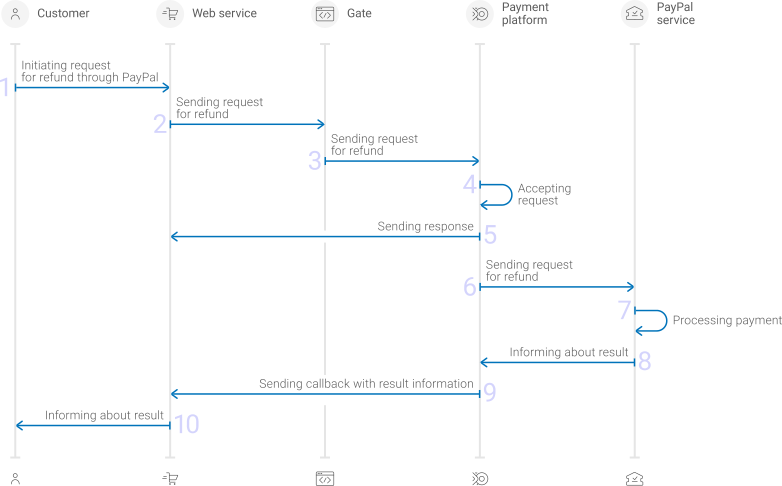
1. A customer initiates a refund.
2. The web service sends the request for performing the refund by using Gate to the specified Ecommpay URL.
3. The payment platform receives the request.
4. The payment platform validates the required parameters and signature in the request.
5. The payment platform sends the response to the web service with information about the receipt of the request and its validity \([details](en_gate_interaction_organisation.md)\).
6. The payment platform performs further processing of the request \(with parameter consistency check\) and sends it to the Paypal service.
7. The refund is processed on the side of the Paypal service.
8. The Paypal service sends the result notification to the payment platform.
9. The payment platform sends the result callback to the web service.
10. The customer receives the refund result information from the web service.
Information about the formats of requests and callbacks used for performing refunds by using the Paypal method via Gate is presented further in this section. General information about working with the Gate API is presented in [Interaction concepts](en_gate_interaction_organisation.md).
### Request format {#section_osx_3jl_ggb .section}
There are several things you need to consider when sending refund requests by using the Paypal method:
1. To initiate each refund, send a separate POST request to the `/v2/payment/wallet/paypal/refund` endpoint, which belongs to the group [/v2/payment/wallet/\{payment\_method\}/refund](https://api-developers.ecommpay.com/api-specification/wallet/post-v2-payment-wallet-payment-method-refund).
2. Each request must include the following objects and parameters:
- Object `general`—general refund information:
- `project_id`—project identifierobtained from Ecommpay during integration
- `payment_id`—identifier of the payment that needs to be refunded
- `signature`—request signaturegenerated after all required parameters are specified \(details—in the [Signature generation and verification](en_platform_signature.md)\)
- Object `payment`—refund information:
- `description`—refund description or comment
- `amount`—refund amount in the smallest currency unit \(required for a partial refund\)
- `currency`—refund currency codein the ISO-4217 alpha-3 format \(required for a partial refund\)
3. Additionally, any other parameters included in the specification can be used.
Thus, a correct refund request by using the Paypal method must contain the project and payment identifiers, description of the refund, signature, and, if necessary, currency code and refund amount.
```language-json
{
"general": {
"project_id": 210,
"payment_id": "test_refund_1",
"signature": "U5LCm6489ly9cXCKIVBNqLks8ZJMR6iNdlUtm1EdHHdA3D19Qg=="
},
"payment": {
"amount": 1000,
"currency": "USD",
"description": "Test PayPal refund"
}
}
```
```language-json
{
"general": {
"project_id": 210,
"payment_id": "test_refund_1",
"signature": "U5LCm6489ly9cXCKIVBNqLks8ZJMR6iNdlUtm1EdHHdA3D19Qg=="
},
"payment": {
"amount": 1000,
"currency": "USD",
"description": "Test PayPal refund"
}
}
```
### Callback format {#section_wsx_3jl_ggb .section}
The Paypal method uses the standard format for callbacks to deliver refund results. For more information, see [Handling callbacks](en_platform_callbacks.md).
The following is the example of a callback with an information about a `10.00 USD` refund for the customer account `2626324568` in the `239` project.
```
{
"customer": {
"id": "7895623"
},
"account": {
"number": "VSAFYPWDD35123"
},
"project_id": 210,
"payment": {
"id": "test_refund_1",
"type": "purchase",
"status": "refunded",
"date": "2019-12-25T09:52:32+0000",
"method": "PayPal Wallet",
"sum": {
"amount": 0,
"currency": "USD"
},
"description": ""
},
"operation": {
"id": 63460000005982,
"type": "refund",
"status": "success",
"date": "2019-12-25T09:52:33+0000",
"created_date": "2019-12-25T09:52:08+0000",
"request_id": "ce8a135fe3ca7a7002d80ad948284c-00063461",
"sum_initial": {
"amount": 1000,
"currency": "USD"
},
"sum_converted": {
"amount": 1000,
"currency": "USD"
},
"code": "0",
"message": "Success",
"provider": {
"id": 1556,
"payment_id": "8YC17810N19968319",
"auth_code": "",
"date": "2019-12-25T09:52:11+0000"
}
},
"signature": "TPqAIy7FUpor...QxJ2MTxuNofnt4or7LdABIrH6JGMGw=="
}
```
The following is the example of a callback with information about a declined refund.
```
{
"customer": {
"id": "7895623"
},
"account": {
"number": "VSAFYPWDD35123"
},
"project_id": 210,
"payment": {
"id": "test_refund_2",
"type": "purchase",
"status": "success",
"date": "2019-12-25T09:52:32+0000",
"method": "PayPal Wallet",
"sum": {
"amount": 1000,
"currency": "USD"
},
"description": ""
},
"operation": {
"id": 63460000005982,
"type": "refund",
"status": "decline",
"date": "2019-12-25T09:52:33+0000",
"created_date": "2019-12-25T09:52:08+0000",
"request_id": "ce8a135fe3c28ad280ad948284c-00063461",
"sum_initial": {
"amount": 1000,
"currency": "USD"
},
"sum_converted": {
"amount": 1000,
"currency": "USD"
},
"code": "20100",
"message": "Decline",
"provider": {
"id": 1556,
"payment_id": "8YC17810N19968319",
"auth_code": "",
"date": "2019-12-25T09:52:11+0000"
}
},
"signature": "TPqAIy7sn5Hp...jGFi2MTdxuNofnt4or7LdABIrH6JGMGw=="
}
```
### Useful links {#section_xsx_3jl_ggb .section}
The following articles can be useful when implementing refunds via Gate:
- [Interaction concepts](en_gate_interaction_organisation.md)—about the interaction with the payment platform by using Gate.
- [Signature generation and verification](en_platform_signature.md)—about the procedure of generating and verifying signatures in requests and callbacks.
- [Payment processing](en_platform_payment_model.md)—about the types, processing models, and possible statuses of supported payments and operations.
- [Purchase refunds](en_Gate_Refund.md)—about performing of refunds by using Gate.
- [Handling operation processing information](en_platform_payment_info_codes.md)—about error and response codes that are used in the payment platform to record information about performing of operations.
## Payouts by using Gate {#en_pm_paypal_gate_payout}
### General information {#section_lsx_3jl_ggb .section}
To process a payout through Gateby using the Paypal method, send a request with all required parameters and signature to the Ecommpay URL and receive a callback with the result.The full sequence and special aspects of payout processing are provided below.
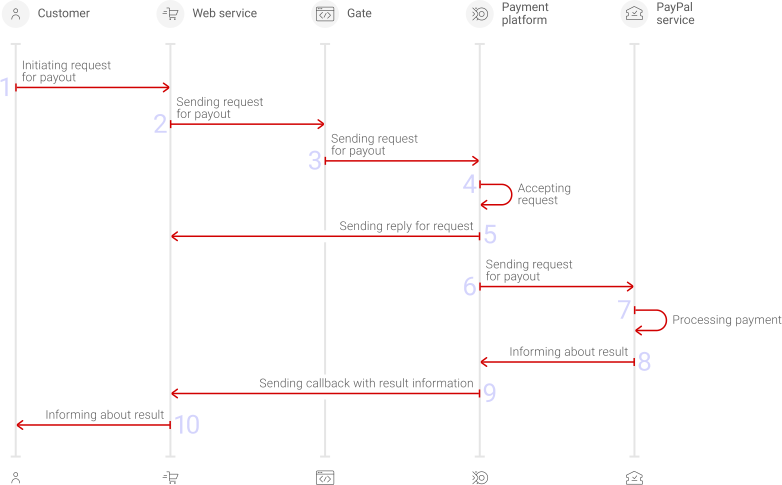
1. A customer initiates a payout by using the Paypal method in the web service.
2. The web service sends the request for processing the payout by using Gate to the specified Ecommpay URL.
3. The payment platform receives the request.
4. The payment platform validates the required parameters and signature in the request.
5. The payment platform sends the response to the web service with information about the receipt of the request and its validity \([details](en_gate_interaction_organisation.md)\).
6. The payment platform performs further processing of the request \(with parameter consistency check\) and sends it to the Paypal service.
7. The payout is processed on the side of the Paypal service.
8. The Paypal service sends the result notification to the payment platform.
9. The payment platform sends the result callback to the web service.
10. The customer receives the payout result information from the web service.
Information about the formats of requests and callbacks used for processing payouts by using the Paypal method via Gate is presented further in this section. General information about working with the Gate API is presented in [Interaction concepts](en_gate_interaction_organisation.md).
### Request format {#section_osx_3jl_ggb .section}
There are several things you need to consider when sending payout requests by using the Paypal method:
1. To initiate each payout send a separate POST request to the `/v2/payment/wallet/paypal/payout` endpoint. This is an e-wallet payments request group [/v2/payment/wallet/\{payment\_method\}/payout](https://api-developers.ecommpay.com/api-specification/wallet/post-v2-payment-wallet-payment-method-payout).
2. Each request must include the following objects and parameters:
- Object `general`—general payout information:
- `project_id`—project identifierobtained from Ecommpay during integration
- `payment_id`—payment identifierunique within the project
- `signature`—request signaturegenerated after all required parameters are specified \(details—in the [Signature generation and verification](en_platform_signature.md)\)
- Object `payment`—payment information:
- `amount`—payout amount in the smallest currency unit
- `currency`—payout currency codein the ISO-4217 alpha-3 format
- Object `customer`—customer information:
- `id`—customer identifierunique within the project
- `ip_address`—customer IP addressrelevant for the initiated payout
- Object `account`—customer e-wallet information:
- `number`—wallet identifier or the email address to which the e-wallet is registered. The choice of the parameter value depends on the type of business of the merchant. For more information contact your Ecommpay key account manager.
3. Additionally, any other parameters included in the specification can be used.
Thus, a correct payout request by using the Paypal method must contain the project identifier, basic payment information \(identifier, amount, and currency code\), customer identifier and IP address, as well as account number and signature.
```language-json
{
"general": {
"project_id": 210,
"payment_id": "test_payment",
"signature": "PJkV8ej\/UG0Di8hTng6JvipTv+AWoXW\/9MTO8yJA=="
},
"payment": {
"amount": 1000,
"currency": "USD"
},
"customer": {
"id": "customer123",
"ip_address": "192.0.2.0"
},
"account": {
"number": "DHEV3UAE54T6G"
}
}
```
### Callback format {#section_wsx_3jl_ggb .section}
The Paypal method uses the standard format for callbacks to deliver payout results. For more information, see [Handling callbacks](en_platform_callbacks.md).
The following is the example of a callback with an information about a `10.00 GBP` payout made to the `DHEV3UAE54T3G` e-wallet made by the `120005` customer in the `112` project.
```language-json
{
"customer": {
"id": "120005"
},
"account": {
"number": "DHEV3UAE54T3G"
},
"project_id": 112,
"payment": {
"id": "test_paypal_payout",
"type": "payout",
"status": "success",
"date": "2020-01-27T12:50:35+0000",
"method": "PayPal Wallet",
"sum": {
"amount": 1000,
"currency": "GBP"
},
"description": "test_payout"
},
"operation": {
"id": 56417000021431,
"type": "payout",
"status": "success",
"date": "2020-01-27T12:50:35+0000",
"created_date": "2020-01-27T12:50:11+0000",
"request_id": "67892324221179817adfdcad60e968f-00056418",
"sum_initial": {
"amount": 1000,
"currency": "GBP"
},
"sum_converted": {
"amount": 1000,
"currency": "GBP"
},
"code": "0",
"message": "Success",
"provider": {
"id": 1556,
"payment_id": "2334",
"auth_code": "",
"date": "2020-01-27T12:50:17+0000"
}
},
"signature": "BmR11YQo8fszf3kMMO66zXDCOpVLXd/y/v0mXN8Huy9V3gA=="
}
```
The following is the example of a callback with information about a declined payout.
```language-json
{
"customer": {
"id": "120005"
},
"account": {
"number": "DHEV3UAE54T3G"
},
"project_id": 112,
"payment": {
"id": "test_paypal_payout2",
"type": "payout",
"status": "decline",
"date": "2020-01-27T12:51:35+0000",
"method": "PayPal Wallet",
"sum": {
"amount": 1000,
"currency": "GBP"
},
"description": "test_payout2"
},
"operation": {
"id": 56417000021432,
"type": "payout",
"status": "decline",
"date": "2020-01-27T12:51:35+0000",
"created_date": "2020-01-27T12:51:11+0000",
"request_id": "67892324221179c7adfdcad60e968f-00056423",
"sum_initial": {
"amount": 1000,
"currency": "GBP"
},
"sum_converted": {
"amount": 1000,
"currency": "GBP"
},
"code": "0",
"message": "Success",
"provider": {
"id": 1556,
"payment_id": "2335",
"auth_code": "",
"date": "2020-01-27T12:51:17+0000"
}
},
"signature": "BmR11YQo8fszfS3kMMO66zXDCOpVLXd/y/v0mXeqewqgV3gA=="
}
```
### Useful links {#section_xsx_3jl_ggb .section}
The following articles can be useful when implementing payouts via Gate:
- [Interaction concepts](en_gate_interaction_organisation.md)—about the interaction with the payment platform by using Gate.
- [Signature generation and verification](en_platform_signature.md)—about the procedure of generating and verifying signatures in requests and callbacks.
- [Payment processing](en_platform_payment_model.md)—about the types, processing models, and possible statuses of supported payments and operations.
- [Payouts](en_Gate_payout.md)—about processing of payouts by using Gate.
- [Handling operation processing information](en_platform_payment_info_codes.md)—about error and response codes that are used in the payment platform to record information about performing of operations.
## Payouts by using Dashboard {#en_pm_dash_payout}
When working with Dashboard, you can process *single* and *mass* payoutsby using the Paypal method.
- To process a single payout, open the payout form, specify all required parameters \(including the payment method\), send a request and verify that the payout has been processed.
- To process a mass payout, prepare and upload a file with information about all target payouts, send a batch request, and verify that the payouts have been processed.
Use a CSV file structured according to the requirements presented in the [Mass payments data](en_dbl_payments.md) section.The payout parameters must comply with the [requirements](pm_paypal.md) \(you do not have to generate a signature because it is specified by Dashboard\).
More information about processing payouts by using Dashboard is presented in a [separate section](en_dbl_payments.md).
## Analysis of payments results {#en_pm_paypal_dash_analysis}
To analyse information about payments made with the Paypal method and other methods, you can use:
- Dashboardinterface toolkitwith various lists and analytic panels.
- Reports in CSV file format, available via the **Reports** section \(one-time and periodically\).
- Data in JSON format, sent by program requests to a specified URL by using the Data API interface.
If you have any questions, refer to the documentation \([Dashboard](en_dbl_about.md) and [Using Data API](en_dbl_api_protocol.md)\) and Ecommpay technical support.