VietQR
An article about the payment method which allows to process payments in Vietnamese dongs by using bank accounts in Vietnam and supports purchases and refunds.
Overview
Introduction
VietQR is a payment method which allows you to process payments in Vietnamese dongs by using bank accounts in Vietnam. VietQR was developed by National Payment Corporation of Vietnam (NAPAS) in collaboration with the Vietnam Banks Association and is widely used in the country. This method supports purchases and refunds.
When making a purchase using the VietQR method, the customer scans the merchant's QR code via their banking application and transfers funds to the merchant directly from their bank account. A refund by using the VietQR method is also performed directly to the customer's bank account that was used for the purchase. This use case, along with the method's status, contributes to customer trust and the active use of the method.
This article provides information about working with the VietQR method: general insights are presented in the Overview section, while information about the actions required to process payments and perform other actions is presented in the sections that follow.
General information
| Payment method type | QR code payments |
|---|---|
| Payment instruments | bank accounts |
| Countries and regions | VN |
| Payment currencies | VND |
| Currency conversion | on the Ecommpay side |
| One-time purchases | + |
| Credential-on-file purchases | – |
| Full refunds | + |
| Partial refunds | – |
| Payouts | – |
| Chargebacks | – |
| Notes |
|
| Onboarding and access fee | refer to your Ecommpay account manager |
Processing of refunds
To perform refunds via the VietQR method, you need to contact Ecommpay technical support and provide the following information:
- Identifier of the original purchase (
payment_id) in the Ecommpay payment platform. - Number of the customer's bank account used for debiting funds during the initial purchase.
- Full name of the holder of the specified bank account (as registered in the bank).
- Current name of the bank servicing the specified account.
Based on the provided information, Ecommpay technical support specialists check the possibility of refunding funds to the customer, initiate the refund on the provider's side, and provide the merchant's specialists with information about its result. If additional information is required to perform the refund, it is also requested from the merchant's specialists. If the refund is performed on the provider's side, the refund operation is registered and processed, and a callback about its processing (informing about the success status) is sent to the web service. If the refund is declined on the provider's or bank's side, the refund operation is not registered in the platform, and information about the refund decline is sent to the merchant's specialists directly by Ecommpay technical support specialists.
The base time for performing a refund using this workflow is one business day.
Interaction diagram
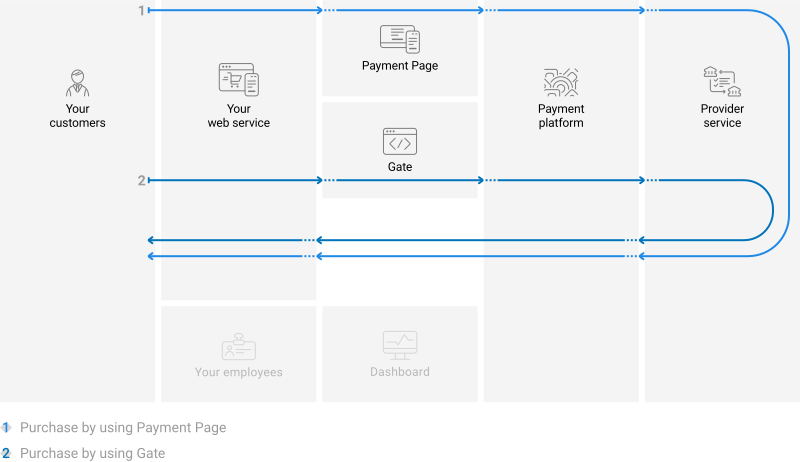
Payment processing by using the VietQR method involves the merchant's web service, one of Ecommpay interfaces, the Ecommpay payment platform, and technical facilities of the provider service.
Operations support
Various platform interfaces can be used to process payments and perform operations using the VietQR method. Purchases can be processed by using Payment Page and Gate. At the same time, regardless of the interfaces used, amount limitations are applicable depending on the bank used for purchase processing.
When working with the VietQR the following amount limits are applicable.
| Amounts, VND | ||
|---|---|---|
| minimum | maximum | |
| Purchases | 1,000 | 50,000,000 |
| Refunds | 1,000 | 50,000,000 |
Processing scenarios
To perform a purchase by using the VietQR method, you need to display the payment instructions and QR code to the customer.
Purchases by using Payment Page
General information
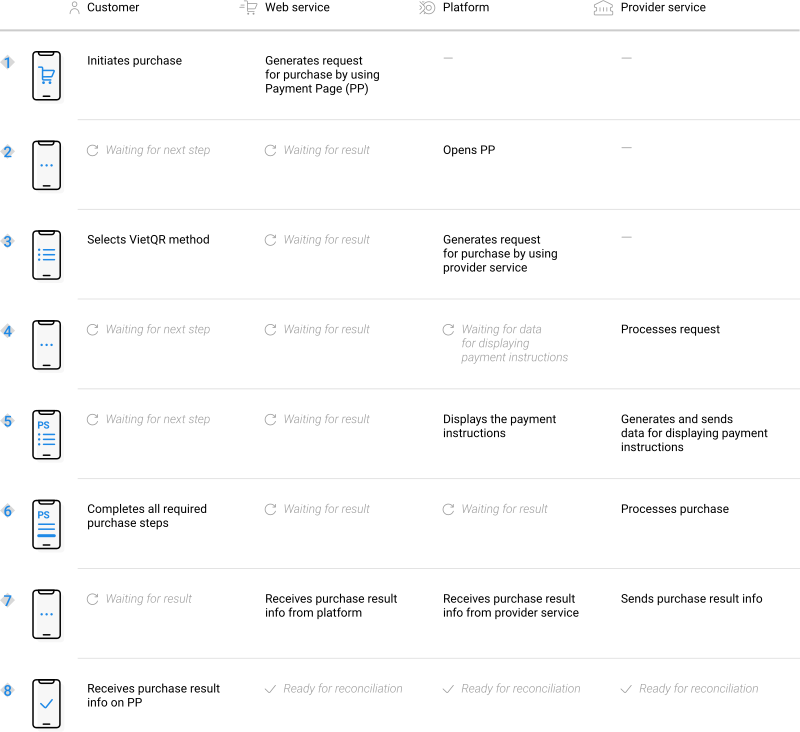
To process a purchase through Payment Page by using the VietQR method, the merchant's web service is required to send a request with all required parameters and signature to the Ecommpay URL and receive a callback with the result. The full sequence and special aspects of purchase processing are provided below.
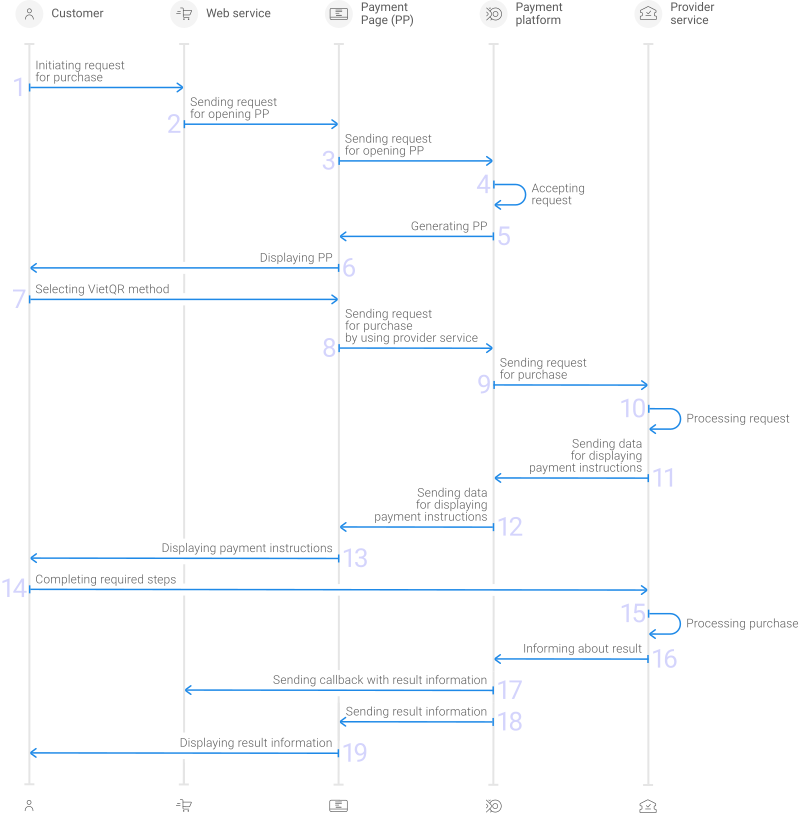
- A customer initiates a purchase in the web service.
- The web service sends the request for opening Payment Page to the specified Ecommpay URL.
- The request for opening Payment Page is sent to the payment platform.
- The payment platform receives the request and validates the required parameters and signature.
- Payment Page is generated based on the project and request parameters.
- Payment Page is displayed to the customer.
- The customer selects the VietQR method.
- The request for processing the payment by using the VietQR method is received by the payment platform.
- The payment platform processes the request and sends it to the provider service.
- The request is processed on the side of the provider service.
- The data for displaying the payment instructions to the customer is sent from the provider service to the payment platform.
- The data for displaying the payment instructions is sent from the payment platform to Payment Page.
- The payment instructions are displayed to the customer.
- The customer completes all required payment steps.
- The purchase is processed in the provider service.
- The provider service sends a notification about the result to the payment platform.
- The payment platform sends the payment result callback to the web service.
- The payment platform sends the result information to Payment Page.
- The result information is displayed to the customer on Payment Page.
Information about the formats of requests and callbacks used for processing payments by using the VietQR method via Payment Page is presented further in this section; general information about working with the Payment Page API is presented in Interaction concepts.
Request format
There are several things you need to consider when sending purchase requests by using the VietQR method:
- The following parameters required for any payment must be specified:
project_id—project identifier obtained from Ecommpay during integrationpayment_id—payment identifier unique within the projectpayment_currency—payment currency code in the ISO-4217 alpha-3 formatpayment_amount—payment amount in the smallest currency unitcustomer_id—customer identifier unique within the project
- The following parameters required for any payment must be specified:
project_id,payment_id,payment_currency,payment_amount,customer_id. - If you need to have the payment form displayed with the VietQR method selected, set the
force_payment_methodparameter tovietqr. - Additionally, any other parameters available for working with Payment Page can be used (details).
- After all target parameters are specified, generate a signature (details).
Thus, a correct request for opening the payment form using the VietQR method must contain the project identifier, basic payment information (identifier, amount, and currency code), customer identifier and signature, as well as possible additional parameters.
{
   "project_id": 120,
   "payment_id": "580",
   "payment_amount": 1000,
   "payment_currency": "VND",
   "customer_id": "customer1",
   "signature": "kUi2x9dKHAVNU0FYldOcZzUCwX6R\/ekpZhkIQg=="
}
{
   "project_id": 120,
   "payment_id": "580",
   "payment_amount": 1000,
   "payment_currency": "VND",
   "customer_id": "customer1",
   "signature": "kUi2x9dKHAVNU0FYldOcZzUCwX6R\/ekpZhkIQg=="
}
Callback format
The VietQR method uses the standard format for callbacks to deliver purchase results. For more information, see Handling callbacks (details).
The following is the example of a callback with information about a ... purchase made by the 300,000 VND customer in the 1234 project.
{
    "project_id": 1234,
    "payment": {
        "id": "payment_47",
        "type": "purchase",
        "status": "success",
        "date": "2022-03-25T11:08:45+0000",
        "method": "VietQR",
        "sum": {
            "amount": 300000,
            "currency": "VND"
        },
        "description": ""
    },
    "customer": {
        "id": "customer_123"
    },
    "operation": {
        "id": 28,
        "type": "sale",
        "status": "success",
        "date": "2022-03-25T11:08:45+0000",
        "created_date": "2022-03-25T11:08:05+0000",
        "request_id": "9e32835fb27907e042b5cf60a4e17839",
        "sum_initial": {
            "amount": 300000,
            "currency": "VND"
        },
        "sum_converted": {
            "amount": 300000,
            "currency": "VND"
        },
        "code": "0",
        "message": "Success",
        "provider": {
            "id": 12345,
            "payment_id": "123abc123-321",
            "auth_code": ""
        }
    },
    "signature": "U7HQO7ToISZhMPkUKQtoYzFvoB3cs9CRd4xeYG2Q=="
}
The following is the example of a callback with information about a declined purchase.
{
    "project_id": 1234,
    "payment": {
        "id": "payment_47",
        "type": "purchase",
        "status": "decline",
        "date": "2022-03-25T11:20:30+0000",
        "method": "VietQR",
        "sum": {
            "amount": 300000,
            "currency": "VND"
        },
        "description": ""
    },
    "customer": {
        "id": "customer_123"
    },
    "operation": {
        "id": 31,
        "type": "sale",
        "status": "decline",
        "date": "2022-03-25T11:20:30+0000",
        "created_date": "2022-03-25T11:19:53+0000",
        "request_id": "fff3d5f8d5d31bc460b68b57dc63f4b482e906eb",
        "sum_initial": {
            "amount": 300000,
            "currency": "VND"
        },
        "sum_converted": {
            "amount": 300000,
            "currency": "VND"
        },
        "code": "20000",
        "message": "General decline",
        "provider": {
            "id": 15923,
            "payment_id": "0cf4215c-8978",
            "auth_code": ""
        }
    },
    "signature": "J7W15rkqrLzTC4z2iFYv58P4VnHANu445/jmY+g=="
}
Useful links
The following articles can be useful when you implement one-time purchases via Payment Page:
- Quickstart—a quickstart guide on how to implement payment processing via Payment Page with the use of SDKs and source code examples.
- Interaction concepts—an article about organising the work with Payment Page on the web service side based on the principles of the payment platform operation.
- Signature generation and verification—an article about signing data in API requests, responses, and callbacks and verifying signatures in order to ensure secure data exchange with the payment platform.
- Payment processing—articles about payment types that can be processed via the platform, workflows and possible statuses of these payments and operations performed within them.
- Purchase processing—an article about processing via Payment Page one-time one-step purchases with immediate debiting of funds.
- Handling operation processing information—an article about statuses and codes that are used in the platform to communicate the statuses of operations and the reasons for declines.
Purchases by using Gate
General information
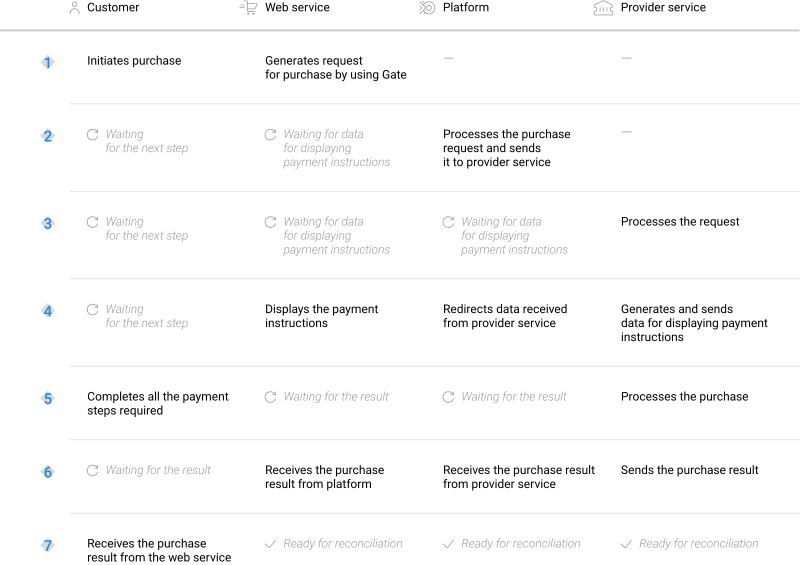
To process a purchase through Gate by using the VietQR method, the merchant's web service is required to do the following:
- Send a request with all the required parameters and signature to the Ecommpay URL.
- Receive an intermediate callback from the payment platform and display the payment instructions and QR code to the customer.
- Receive the final callback from the payment platform.
The full sequence and special aspects of purchase processing are provided below.
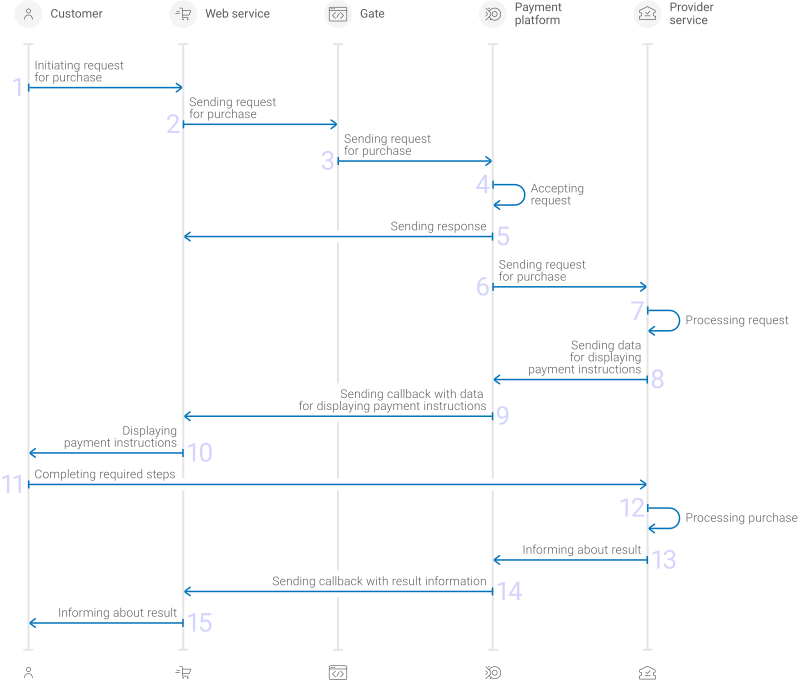
- A customer initiates a purchase by using the VietQR method in the web service.
- The web service sends the request for processing the purchase by using Gate to the specified Ecommpay URL.
- The payment platform receives the request.
- The payment platform validates the required parameters and signature in the request.
- The payment platform sends the response to the web service with information about the receipt of the request and its validity (details).
- The payment platform performs further processing of the request (with parameter consistency check) and sends it to the provider service.
- The request is processed on the side of the provider service.
- The data for displaying the payment instructions to the customer is sent from the provider service to the payment platform.
- The data for displaying the payment instructions is sent from the payment platform to the web service.
- The payment instructions are displayed to the customer.
- The customer completes all required payment steps.
- The purchase is processed in the provider service.
- The provider service sends the payment result notification to the payment platform.
- The payment platform sends the payment result callback to the web service.
- The customer receives the payment result information from the web service.
Information about the formats of requests and callbacks used for processing payments by using the VietQR method via Gate is presented further in this section. General information about working with the Gate API is presented in Interaction concepts.
Request format
There are several things you need to consider when sending purchase requests by using the VietQR method:
- To initiate each purchase, send a separate POST request to the /v2/payment/vietqr/sale endpoint.
- Each request must include the following objects and parameters:
- Object
general—general purchase information:project_id—project identifier obtained from Ecommpay during integrationpayment_id—payment identifier unique within the projectsignature—request signature generated after all required parameters are specified (details—in the Signature generation and verification) (details)
- Object
payment—payment information:amount—payment amount in the smallest currency unitcurrency—payment currency code in the ISO-4217 alpha-3 format
- Object
customer—customer information:id—customer identifier unique within the projectip_address—customer IP address relevant for the initiated payment
- Object
- Additionally, any other parameters included in the specification can be used.
Thus, a correct purchase request by using the VietQR method must contain the project identifier, basic payment information (identifier, amount, and currency code), customer identifier and IP address, signature, as well as possible additional parameters.
{
  "general": {
    "project_id": 210,
    "payment_id": "test_payment",
    "signature": "PJkV8ej\/UG0Di8hTng6JvipTv+AWoXW\/9MTO8yJA=="
  },
  "payment": {
    "amount": 1000,
    "currency": "VND"
  },
  "customer": {
    "id": "customer123",
    "ip_address": "192.0.2.0"
  }
}
{
  "general": {
    "project_id": 210,
    "payment_id": "test_payment",
    "signature": "PJkV8ej\/UG0Di8hTng6JvipTv+AWoXW\/9MTO8yJA=="
  },
  "payment": {
    "amount": 1000,
    "currency": "VND"
  },
  "customer": {
    "id": "customer123",
    "ip_address": "192.0.2.0"
  }
}
Formats of intermediate callbacks for displaying payment instructions
Each payment made with the VietQR method requires displaying payment instructions to customers. To display payment instructions it is necessary to receive an intermediate callback from the payment platform and use the information included in the display_data array. The format of such callbacks is standard (details).
The following objects and parameters are included in the display_data array:
type—type of data (the value is alwaysqr_data)title—the name of the transferred data that needs to be displayed to the customer (the value is alwaysQR code)data—a string based on which a QR code should be generated on the web service side (according to ISO/IEC 18004:2015)
"display_data": [
            {
                "type": "qr_data",
                "title": "QR code",
                "data": "00020101000005800113C6616TTAE11"
            }
        ]
Final callback format
The VietQR method uses the standard format for callbacks to deliver purchase results. For more information, see Handling callbacks (details).
The following is the example of a callback with information about a 300,000 VND purchase made in the 1234 project.
{
    "project_id": 1234,
    "payment": {
        "id": "payment_47",
        "type": "purchase",
        "status": "success",
        "date": "2022-03-25T11:08:45+0000",
        "method": "VietQR",
        "sum": {
            "amount": 300000,
            "currency": "VND"
        },
        "description": ""
    },
    "customer": {
        "id": "customer_123"
    },
    "operation": {
        "id": 28,
        "type": "sale",
        "status": "success",
        "date": "2022-03-25T11:08:45+0000",
        "created_date": "2022-03-25T11:08:05+0000",
        "request_id": "9e32835fb27907e042b5cf60a4e17839",
        "sum_initial": {
            "amount": 300000,
            "currency": "VND"
        },
        "sum_converted": {
            "amount": 300000,
            "currency": "VND"
        },
        "code": "0",
        "message": "Success",
        "provider": {
            "id": 12345,
            "payment_id": "123abc123-321",
            "auth_code": ""
        }
    },
    "signature": "U7HQO7ToISZhMPkUKQtoYzFvoB3cs9CRd4xeYG2Q=="
}
The following is the example of a callback with information about a declined purchase.
{
    "project_id": 1234,
    "payment": {
        "id": "payment_47",
        "type": "purchase",
        "status": "decline",
        "date": "2022-03-25T11:20:30+0000",
        "method": "VietQR",
        "sum": {
            "amount": 300000,
            "currency": "VND"
        },
        "description": ""
    },
    "customer": {
        "id": "customer_123"
    },
    "operation": {
        "id": 31,
        "type": "sale",
        "status": "decline",
        "date": "2022-03-25T11:20:30+0000",
        "created_date": "2022-03-25T11:19:53+0000",
        "request_id": "fff3d5f8d5d31bc460b68b57dc63f4b482e906eb",
        "sum_initial": {
            "amount": 300000,
            "currency": "VND"
        },
        "sum_converted": {
            "amount": 300000,
            "currency": "VND"
        },
        "code": "20000",
        "message": "General decline",
        "provider": {
            "id": 15923,
            "payment_id": "0cf4215c-8978",
            "auth_code": ""
        }
    },
    "signature": "J7W15rkqrLzTC4z2iFYv58P4VnHANu445/jmY+g=="
}
Useful links
The following articles can be useful when you implement one-time purchases via Gate:
- Quickstart—a quickstart guide on how to implement payment processing via Gate with the use of source code examples in PHP and Go.
- Interaction concepts—an article about organising the work with Gate on the web service side based on the principles of the payment platform operation and the utilised interaction flows and formats.
- Signature generation and verification—an article about signing data in API requests, responses, and callbacks and verifying signatures in order to ensure secure data exchange with the payment platform.
- Payment processing—articles about payment types that can be processed via the platform, workflows and possible statuses of these payments and operations performed within them.
- One-step purchase—an article about processing via Gate one-time one-time one-step purchases with immediate debiting of funds.
- Payouts—an article about processing payouts via Gate.
- Handling operation processing information—an article about statuses and codes that are used in the platform to communicate the statuses of operations and the reasons for declines.
Analysis of payments results
To analyse information about payments made with the VietQR method, as well as other methods, you can use:
- Dashboard interface toolkit with various lists and analytic panels.
- Reports in CSV file format, available via the Reports section (one-time and periodically).
- Data in JSON format, sent by program requests to a specified URL available by using the Data API interface.
If you have any further questions regarding payment data analysis, refer to the documentation (Dashboard and Using Data API) and Ecommpay technical support.