Receiving financial statements
An article about the capabilities of exporting reports with high-level data on final financial results for payment processing across individual balances.
Overview
Dashboard allows you to receive and use financial statements from Ecommpay for analysing the final financial results for your projects in the payment platform. A financial statement includes total operational results, fees charged, and balance information for a specified reporting period. This data can be used for final analysis and reconciliation.
Setting up the specific parameters of receiving the financial statements (i.e. desired frequency, delivery options, and project relevance) should be done in consultation with the Ecommpay technical support. As a rule, financial statements are delivered via email or can be viewed in Dashboard in the Finance section (the user account must be granted the appropriate permissions to access the Financial statements tab of the section; details).
Special aspects
When working with the financial statements from Ecommpay, you need to consider the following special aspects.
- Project-based access. A financial statement prepared in the payment platform focuses on a single project. Therefore, in Dashboard, you can receive statements only for the projects available for your user account.
- Locked time zone. All financial statements are generated strictly in the UTC+03:00 time zone, regardless of the time zone configured for your user account in Dashboard.
- Structure. Each financial statement contains a strictly defined set of data for a specific balance.
- Formats. A single financial statement can be downloaded as a PDF or XLSX file (as agreed upon) while a group of statements prepared simultaneously and related to one project can be compressed into a single ZIP file (if requested).
- Static data and unlimited retention time. A financial statement is considered up to date at the moment of its preparation and is not continuously updated afterwards. Financial statement files are stored in the payment platform and are available for download without any time restrictions.
Setup and configuration
If you need to receive financial statements via Dashboard or if you need to make changes to the existing reporting arrangement, contact the Ecommpay technical support. You can set up the reporting time periods, delivery options, and schedule of statement preparation, as well as the sender and recipient email addresses for the statement emails (as a rule, the statements are delivered to email addresses associated with the Dashboard user account).
Receiving financial statements
To receive financial statements in the Dashboard interface, you need to do the following.
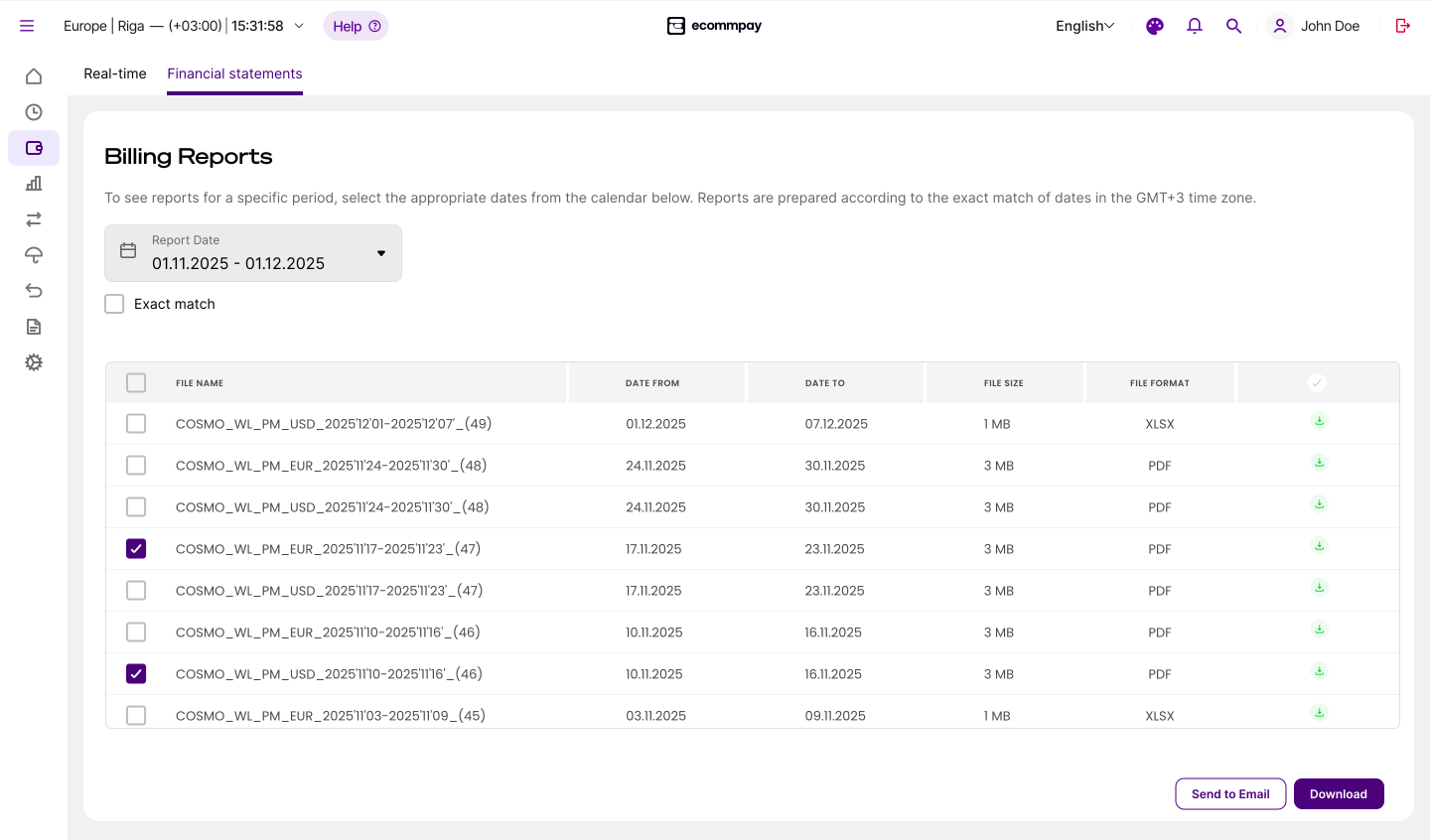
- Open the Financial statements tab in the Finance section, set the start and end dates of the reporting period using the calendar, and indicate whether the range must be exactly matched by selecting the Exact match checkbox.
If you select the Exact match checkbox, you will receive statements that exactly match the specified date range; otherwise, in addition to the statements that match the date range, you will receive all statements that have either the start or the end date within that range.
- Download financial statements or send them to your email by selecting the checkboxes in the corresponding rows and clicking the appropriate button in the bottom right corner of the tab.
To download a single file, click
 in the corresponding row of the list. To download multiple files, select checkboxes in corresponding rows of the list and then click Download in the lower right corner of the tab that opens.
To send files to the email address associated with your Dashboard user account, select checkboxes in corresponding rows of the list and then click Send to Email in the bottom right corner of the tab that opens.
- Make sure that the files have been received.
The file download status will be shown in your browser, and an email notification will be sent to your email address. If any issues arise, go back to the previous step.