Using the Verification of Payee service
An article about the procedure of verifying customers' names when payouts to bank accounts using the SEPA payment scheme are initiated via Gate.
Overview
In accordance with the European Union's Instant Payments Regulation (IPR), for bank transfers using the SEPA payment scheme in the Single Euro Payments Area (SEPA), the names of recipients must undergo the Verification of Payee check. This regulation applies to cases where the sender and recipient are registered in SEPA member countries. As part of this verification, the spelling of the recipient's name provided by the merchant must be compared with the spelling recorded by the bank for the owner of the specified account, and based on the result of this verification that the merchant must make the decision whether to transfer the funds.
When applied during payment processing via the payment platform, the Verification of Payee is carried out with the participation of the service provider and may be relevant for certain payment methods, such as Payouts to bank accounts in the SEPA. When using such methods, you can configure how verification results are processed: on the web service or payment platform side (details below), as well as the period during which verification status information is considered valid. During this period additional verifications for identical cases are not required (operations regarding verified pairs of customers and accounts). By default, this period is 10 days.
To set up the Verification of Payee procedure contact your Ecommpay account manager. Using this procedure does not affect the calculation of payment fees. If you have any questions about the Verification of Payee procedure regarding specific methods, please refer to the descriptions of these methods in this documentation or contact Ecommpay technical support specialists.
Workflows
The merchant can select and use one of the available Verification of Payee workflows for each project.
- Processing of verification results on the platform side can be organised by using one of the predefined algorithms for approving and declining operations based on the final verification status. This option requires the merchant to agree to a suitable algorithm and allows accounting for verification results via the analysis of final operation callbacks.
- Processing of verification results on the web service side can be organised by using any algorithm (taking into account not only the final status of each verification, but also, for example, the amount of the initiated operation and the history of interactions with a specific customer). This option requires the merchant to configure and implement the appropriate algorithms, as well as to organise additional interactions between the web service and the platform for each operation including the verification procedure.
To enable each of the workflows, as well as to switch between them, contact your Ecommpay account manager. The setup procedure for each workflow is described in more detail below, in the relevant sections of this article.
Setup
To have the Verification of Payee procedure set up, merchants should complete the following steps:
- Coordinate the process with your Ecommpay account manager: discuss the setup procedure and the relevant workflow, as well as the need to change the validity period of the verification results (by default, it is 10 days) and whether it is necessary to test the procedure.
- If it was agreed that testing is required, wait to be notified by the Ecommpay specialists when the testing can begin. After that, inform the account manager that you are ready to launch the procedure in your production environment.
- Receive the notification from the Ecommpay specialists about the completion of the procedure setup.
Statuses
When you use the Ecommpay payment platform, the final status of each Verification of Payee check is indicated by one of the following statuses:
MATCH—indicates a full spelling match between the names recipient's name specified in the request and the name recorded by the bank for the owner of the specified account.CLOSE_MATCH—indicates a partial spelling match between the names recipient's name specified in the request and the name recorded by the bank for the owner of the specified account.NO_MATCH—indicates a complete spelling mismatch between the names recipient's name specified in the request and the name recorded by the bank for the owner of the specified account.VERIFICATION_NOT_POSSIBLE—indicates the impossibility of verification due to errors on the service provider side.VOP_ERROR—indicates the impossibility of verification due to errors in the interaction between the platform and the provider service.
The interpretation of full and partial matches, as well as complete mismatches in name spellings, is applied in accordance with the IPR. It should also be noted that many banks tend to reject operations set to the VERIFICATION_NOT_POSSIBLE verification status, even if such operations can be processed on the platform side and their risk level is low based on other criteria.
Processing on the platform side
Algorithms
When processing the Verification of Payee verification results on the Ecommpay payment platform side, it is permissible to select and use one of the following operation approval algorithms (with subsequent processing after the final verification status is set and matches one of the approved ones).
- Algorithm 1 is based on the following rules:
MATCHstatus indicates that the corresponding operation can be processed.CLOSE_MATCH,NO_MATCH,VERIFICATION_NOT_POSSIBLEandVOP_ERRORstatuses indicate that the corresponding operation cannot be processed.
- Algorithm 2 is based on the following rules:
MATCHandCLOSE_MATCHstatuses indicate that the corresponding operation can be processed.NO_MATCH,VERIFICATION_NOT_POSSIBLEandVOP_ERRORstatuses indicate that the corresponding operation cannot be processed.
- Algorithm 3 is based on the following rules:
MATCH,CLOSE_MATCHandVERIFICATION_NOT_POSSIBLEstatuses indicate that the corresponding operation can be processed.NO_MATCHandVOP_ERRORstatuses indicate that the corresponding operation cannot be processed.
- Algorithm 4 is based on the following rule: all statuses (including the
NO_MATCHstatus) as well as statuses indicating the impossibility of verification indicate that the corresponding operation can be processed.
These rules can be briefly presented in the form of a table.
| Status | Approval algorithms | |||
|---|---|---|---|---|
| 1 | 2 | 3 | 4 | |
MATCH |
+ | + | + | + |
CLOSE_MATCH |
– | + | + | + |
NO_MATCH |
– | – | – | + |
VERIFICATION_NOT_POSSIBLE |
– | – | + | + |
VOP_ERROR |
– | – | – | + |
Result monitoring
Information about the Verification of Payee result for any operation within this workflow can be obtained via a final callback containing information about the operation completion. Callbacks in such cases use a standard format, described in the article Handling callbacks. Information about the final status of this verification is specified in the parameters of the provider_extra_fields object. In cases where operations are declined, you can additionally rely on the final response codes for verification information, such as these:
20450—when an operation is declined due to a failed verification (for theVERIFICATION_NOT_POSSIBLEstatus in algorithms 1–2 and theVOP_ERRORstatus in algorithms 1–3).20451—when an operation is declined due to the final verification status not matching the approved status (for theCLOSE_MATCHstatus in algorithm 1 and theNO_MATCHstatus in algorithms 1–3).
The following is an example of a callback with information about a 10.00 EUR payout made in the 239 project. The vop_status parameter of the provider_extra_fields object included in this callback indicates the CLOSE_MATCH status of the verification.
{
        "provider_extra_fields": {
            "customer_name": "John Smit",
            "operation_id_in_ps": "TX55DE3DEFC161XT",
            "vop_status": "CLOSE_MATCH",
            "vop_message": "Reasons: NAME_MISMATCH; Details: The account details are a close match.; Matched: name: JOHN SMITH"
        },
        "customer": {
            "id": "1"
        },
        "account": {
            "number": "LV35HA******6833"
        },
        "project_id": 239,
        "payment": {
            "id": "Test payment 02042026-111",
            "type": "payout",
            "status": "success",
            "date": "2026-04-02T11:12:47+0000",
            "method": "world",
            "sum": {
                "amount": 1000,
                "currency": "EUR"
            },
            "description": "test payout"
        },
        "operation": {
            "sum_initial": {
                "amount": 1000,
                "currency": "EUR"
            },
            "sum_converted": {
                "amount": 1,
                "currency": "EUR"
            },
            "code": "0",
            "message": "Success",
            "provider": {
                "id": 16711,
                "payment_id": "P21132ZU06",
                "auth_code": "",
                "date": "2026-04-02T11:11:51+0000"
            },
            "id": 94413010223457,
            "type": "payout",
            "status": "success",
            "date": "2026-04-02T11:12:47+0000",
            "created_date": "2026-04-02T11:11:43+0000",
            "request_id": "7eee81073a807f30094414"
        },
        "signature": "<signature>"
    }
The following is an example of a callback with information about a payout declined due to complete mismatch of the names, which is indicated by the NO_MATCH status.
{
        "provider_extra_fields": {
            "vop_status": "NO_MATCH",
            "vop_message": "Reasons: NAME_MISMATCH, ACCOUNT_MISMATCH; Details: The account and name do not match."
        },
        "customer": {
            "id": "1"
        },
        "account": {
            "number": "LV35HA******6833"
        },
        "project_id": 155543,
        "payment": {
            "id": "Test payment 02042026-115",
            "type": "payout",
            "status": "decline",
            "date": "2026-04-02T11:22:20+0000",
            "method": "world",
            "sum": {
                "amount": 1,
                "currency": "EUR"
            },
            "description": "test payout"
        },
        "operation": {
            "sum_initial": {
                "amount": 1,
                "currency": "EUR"
            },
            "sum_converted": {
                "amount": 1,
                "currency": "EUR"
            },
            "code": "20451",
            "message": "Payout or refund cannot be processed based on the Verification of Payee result",
            "provider": {
                "id": 16711,
                "payment_id": "",
                "auth_code": ""
            },
            "id": 43116010187149,
            "type": "payout",
            "status": "decline",
            "date": "2026-04-02T11:22:21+0000",
            "created_date": "2026-04-02T11:22:18+0000",
            "request_id": "21356"
        },
        "signature": "1wR1YgDoDlJppOdLzFOFK...Y4YonbWmspbFh7x1o1ut5PxxTIJfQ=="
    }
Processing on the web service side
Overview
When processing Verification of Payee results on the web service side, additional interactions between the web service and the platform must be organized for each transaction involving the verification procedure. This involves a series of steps between accepting a customer request to receive funds and initiating the corresponding operation in the platform:
- Send a Verification of Payee request (with the required parameters and signature) to the Ecommpay URL.
- Receive a synchronous response from the payment platform containing the information about initiating the verification.
- After at least 10 seconds, send a request to receive verification result information (with the required parameters and signature) to the Ecommpay URL.
- Receive a synchronous response from the payment platform containing the information about the verification status.
After this process, in each case, a decision must be made on the web service side regarding the permissibility of the operation (in accordance with the implemented internal algorithm), and this operation must be initiated in the platform or the customer must be notified of the error.
The full sequence and special aspects of the Verification of Payee process are provided below.
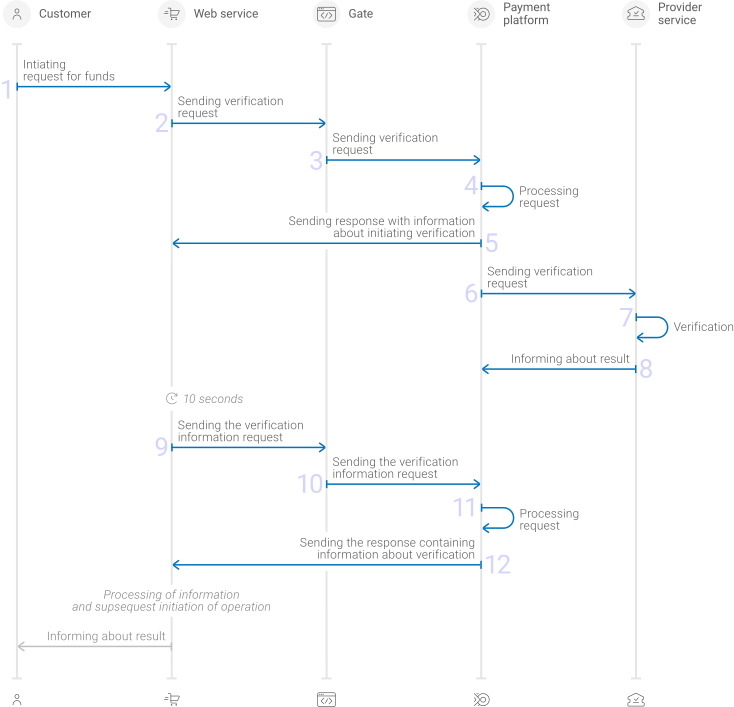
- A customer initiates a request for funds.
- The web service sends the request for Verification of Payee by using Gate to the specified Ecommpay URL.
- The payment platform receives the Verification of Payee request.
- The payment platform processes the request, validates the required parameters and initiates the verification.
- The payment platform sends the response to the web service with information about the receipt of the request and its processing, as well as the information about the initiation of the verification.
- The payment platform performs sends the verification request to the provider service.
- The Verification of Payee is performed on the provider service side.
- The provider service sends information about the verification result to the payment platform.
- Not less than 10 seconds after receiving the response containing the information about the verification initiation, the web service sends the request for the verification result information by using Gate to the specified Ecommpay URL.
- The payment platform receives the verification information request.
- The payment platform processes the request, validates the required parameters and searches for the requested information.
- The payment platform sends the response to the web service with information about the receipt of the request and its validity, as well as the information about the status of the verification.
- The web service processes the received information and performs the subsequent actions based on the verification status, informing the customer about the status of their request to receive funds.
Information about the formats of requests and responses used during this process is presented further in this section.
Verification of Payee request format
There are several things you need to consider when sending Verification of Payee requests:
- To initiate each verification, send a separate POST request to the /v2/verification-of-payee/create endpoint.
- Each request must include the following objects and parameters:
- Object
general—general purchase information:project_id—project identifier obtained from Ecommpay during integrationsignature—request signature generated after all required parameters are specified (details—in the Signature generation and verification) (details)
- Object
payment—payment information:currency—payment currency code in the ISO-4217 alpha-3 format
- Object
account—customer account information:customer_name—full name or title of the account holdernumber—account number
- Object
{
  "general": {
    "project_id": 12345,
    "signature": "PJkV8ej\/UQVVfBaNIipTv+AWoXW\/9MTO8yJA=="
  },
  "payment": {
    "currency": "EUR"
  },
  "account": {
    "customer_name": "John Doe",
    "number": "DOMESTIC_ACC_NUMBER_12345678"
  }
}
Verification of Payee initiation response format
A response to the Verification of Payee request is formatted according to the guidelines listed in Interaction concepts. Note that:
- If the verification was initiated, the following parameters are included in the
vopobject:id—the verification identifier assigned on the provider side.status—the intermediate verification status, the value isprocessing.
- If the verification was not initiated due to errors on the provider or platform side, the
vopobject is not included in the response.
{
  "status": "success",
  "request_id": "3213123",
  "project_id": 12345,
  "vop": {
    "id": 777888,
    "status": "processing"
  }
}
Request format for receiving verification information
There are several things you need to consider when sending verification information requests:
- To request information on each verification, send a separate POST request to the /v2/verification-of-payee/result endpoint.
- Each request must include the following objects and parameters:
- Object
general—general purchase information:project_id—project identifier obtained from Ecommpay during integrationsignature—request signature generated after all required parameters are specified (details—in the Signature generation and verification) (details)
- Object
vop—Verification of Payee information:id—verification identifier obtained from Ecommpay in the verification initiation response
- Object
{
  "general": {
    "project_id": 12345,
    "signature": "PJkV8ej\/UQVVfBaNIipTv+AWoXW\/9MTO8yJb=="
  },
  "vop": {
    "id": 777888
  }
}
Verification of Payee information response format
A response to the Verification of Payee information request is formatted according to the guidelines listed in Interaction concepts. Wherein, depending on the situation, the following parameters can be included in the vop object in such responses:
id—identifier of the required verificationstatus—a verification status indicator that can take one of the following values:processing—if the final verification status is not received from the service providercompleted—if the final verification status is received from the service providerdecline—if verification is impossible due to errors in the interaction between the platform and the service provider
result—the final verification status (details; not included in the response if thestatusparameter isprocessing)details—additional details to the final verification status from the service provider (not included in the response if thestatusparameter isprocessingor if the result parameter isVOP_ERROR)
In cases where the final status is VOP_ERROR, you are recommended to contact technical support specialists to clarify information about the verification and whether it can be performed.
{
  "general": {
    "project_id": 12345,
    "signature": "kUi2x9dKHAVNU0FYldOcZzUCwX6R\/ekpZhkIQg=="
  },
  "vop": {
    "id": 777888,
    "status": "completed",
    "result": "CLOSE_MATCH",
    "details": "Reasons: CLOSE_MATCH; Details: The account details match.; Matched: name: John Doe, accountType: personal account"
  }
}
Useful links
The following articles can be useful when using Verification of Payee:
- Quickstart and Interaction concepts—about the interaction with the payment platform by using Gate.
- Signature generation and verification—about the procedure of generating and verifying signatures in requests and callbacks.
- Handling operation processing information—about error and response codes that are used in the payment platform to record information about performing of operations.