Using dynamic merchant descriptor
An article about the capability of providing customers with information about merchants via issuer services.
Overview
When Ecommpay acts as an acquirer, in compliance with the rules of card networks Ecommpay shares merchant details with other parties involved in payment processing. These details can be used by each party at its discretion and can be specified in receipts and bank statements by issuers.
By default, merchant information is static and limited to the agreed upon name of the merchant. However, the merchant can dynamically append additional details relating to a particular payment or other aspects of their business. These dynamic descriptions can be included in to payment requests. and are only limited to the maximum string length and the permitted character set (details). For example, the merchant descriptor can include the merchant's name combined with a booking period (Cosmotour* 17-19 feb) or with the name of the reserved hotel (Cosmotour* MarsSuite).
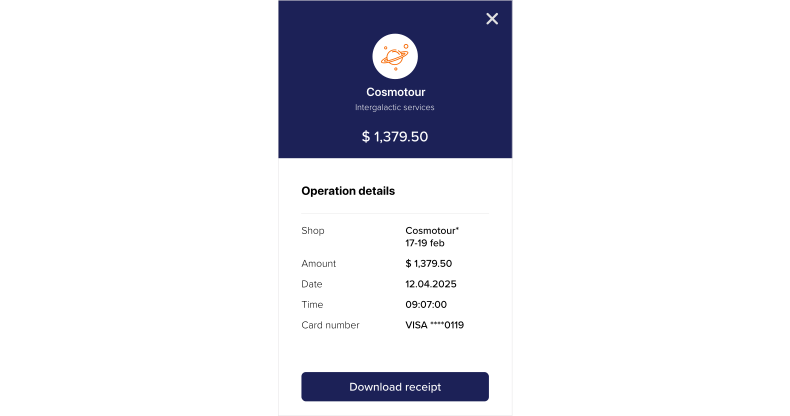
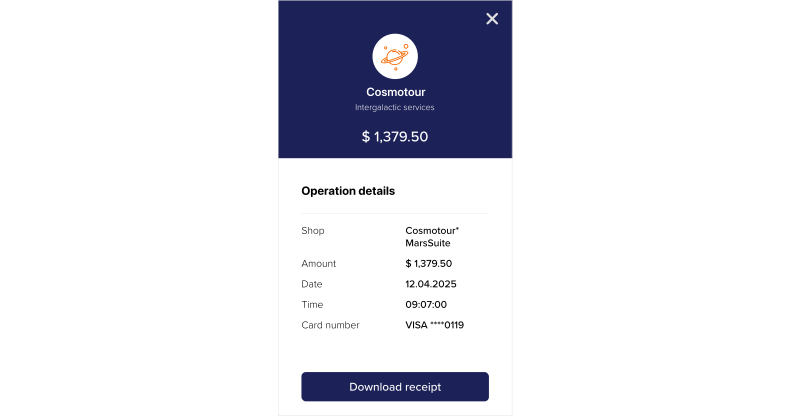
Flexible use of accurate and informative details makes it easier for customers to identify merchants and payments and allows merchants to improve user experience and reduce the risk of disputes. In the Ecommpay payment platform, dynamic descriptors are relevant for card payments (including standard card payments and payments made with Apple Pay, Click to Pay, Google Pay, and Visa Instalments) and such payment types as one-time and COF purchases, payouts, and payment instrument verification.
Special aspects
When working with merchant data, consider the following special aspects:
- The primary purpose of the merchant descriptor is to help customers recognise payments they made and prevent unnecessary chargebacks.
Hence, avoid ambiguous or potentially misleading information in the merchant descriptor. Focus on the information that enables the customer to identify both the merchant and each operation clearly. In particular, it is recommended that you use a familiar brand name together with a concise description of the goods or services related to the operation.
- Requirements to the merchant descriptor can vary depending on the card network.
Pay attention to such differences, at least regarding the supported formats (details).
- The way merchant details are provided to customers is determined by issuers.
How merchant details will appear in receipts, bank statements, and other communication with the customer is determined by the rules of a specific issuer. As a result, merchant details may vary across issuers, different interfaces of the same issuer, and different operation types within a single interface. In particular, there may be differences due to processing different types of purchases ans payouts as well as Mastercard MoneySend and Visa Direct operations.
Setup
The name of the merchant to be used as a default merchant descriptor is specified when the merchant is onboarded with the payment platform and, subsequently, can only be modified via the Ecommpay account manager.
To enable the use of the dynamic merchant descriptor, continue as follows:
- Coordinate with the Ecommpay account manager the roadmap of enabling the functionality for specific projects and the necessity for testing.
- If you need testing, get notified by the Ecommpay specialists that the capability is ready for being used in test mode, test this capability, and inform Ecommpay that everything is ready to launch.
- Get notified by the Ecommpay specialists that the capability has been added and fully set up.
Use
If you need to use the dynamic merchant descriptor, include the descriptor parameter in the payment requests. Pass this parameter in the merchant and sender objects. If both objects are supported for a given endpoint, the descriptor parameter can be specified in either. However, when both objects are passed, priority is given to a more relevant object the following objects:
merchantfor purchases and payment instrument verificationsenderfor payouts
Keep in mind that in cases when the value of the descriptor parameter does not conform to the required format (details), the platform can automatically correct it (for example, by transliterating alphabetic characters and removing invalid non-alphabetic characters). Such correction of values does not lead to declined payments. Also, note that the Ecommpay platform does not validate the value of the descriptor parameter for factual correctness, but this information can be analysed and subsequently used by the issuers. Merchants should therefore ensure that values provided in the descriptor parameter are both technically compliant and contextually accurate in every instance of use.
- for one-time one-step purchases with payment details provided as is or via the network tokens—/v2/payment/card/sale
- for one-time one-step purchases with payment details provided via the internal tokens generated in the platform—/v2/payment/card/sale/token
- for one-time two-step purchases with payment details provided as is or via the network tokens—/v2/payment/card/auth
- for one-time two-step purchases with payment details provided via the internal tokens generated in the platform—/v2/payment/card/auth/token
- for COF purchases of all types—/v2/payment/card/recurring
- for payouts with payment details provided as is—/v2/payment/card/payout
- for payouts with payment details provided via the internal tokens generated in the platform—/v2/payment/card/payout/token
- for payment instrument verification with payment details provided as is or via the network tokens—/v2/payment/card/account_verification
- for payment instrument verification with payment details provided via the internal tokens generated in the platform—/v2/payment/card/account_verification/token
- for one-time one-step purchases—/v2/payment/applepay/sale
- for one-time two-step purchases—/v2/payment/applepay/auth
- for one-time one-step purchases—/v2/payment/googlepay/sale
- for one-time two-step purchases—/v2/payment/googlepay/auth
Data format
The maximum length of the merchant descriptor is determined by the card network. Mastercard sets a maximum length of 22 characters, while Visa sets a maximum length of 25 characters. Any characters exceeding these limits are truncated. Keep these limits and the allowed character requirements in mind when generating descriptions. The descriptor parameter can contain characters from the basic Latin alphabet, digits, a space character (U+0020), and the following symbols:
* |
U+002A | asterisk |
, |
U+002C | comma |
- |
U+002D | hyphen |
. |
U+002E | full stop |
= |
U+003D | equals sign |
_ |
U+005F | underscore |
When generating the descriptor parameter, use the agreed upon merchant's name followed by additional details separated by an asterisk (*) and a space., ensuring compliance with the applicable string length restrictions. For example, if a 9-character name Cosmotour is used with a 2-character separator, the remaining string length available for additional details is 11 characters for Mastercard and 14 characters for Visa. This is enough for a value such as Cosmotour* to the Moon.
{
"payment": {
"amount": 1000,
"currency": "EUR",
"description": "Payout"
},
"general": {
"project_id": 91348,
"payment_id": "135113521354",
"signature": "iehD3ZeW3CM7aGfmdgfjdgneHbCmronMpXom1b/ot1HvOGMV+CT8LA=="
},
"customer": {
"id": "16061313",
"ip_address": "93.47.230.225",
"first_name": "John",
"last_name": "Doe"
},
"sender": {
"descriptor": "Cosmotour* to the Moon" // merchant details
},
"card": {
"save": false,
"pan": "4314220000000056"
}
}