Currency conversion
An article about the capability of processing payments via Payment Page in different currencies with currency conversion.
Introduction
The Ecommpay payment platform supports payments in multiple currencies with automatic conversion (when payment amounts are recalculated according to the exchange rate between two currencies). You can configure the following options to make payments more flexible and convenient:
- Setting up balances in different currencies.
- Configuring payment methods and channels in different operating currencies.
- Allowing your customers to select the currency of the purchase in your web service or directly in Payment Page (details).
Using each of the aforementioned options can be limited due to the specifics of the way partners and providers operate, regional specifics, and other factors. However, in most cases these options let you adapt this functionality to your business model and use both local and global currencies efficiently.
For information about setup and use, refer to this and other articles on the documentation portal, or contact your Ecommpay account manager.
Conversion scenarios
Processing a payment via the Ecommpay platform can involve four kinds of currency:
- Requested payment currency—the currency specified by the merchant in the initial payment request.
- Actual operation currency (can also be referred to as settlement currency)—the currency used in the platform for processing the payment and determined on the basis of various factors.
- Payment instrument currency—the currency of the customer’s payment instrument used for making a payment.
- Balance currency—the currency of the merchant’s balance associated with the payment.
If all these currencies are the same, no conversion is required. If at least one differs, conversion is necessary, since the payment cannot be completed otherwise.
If at least one of these currencies differs, conversion is necessary.
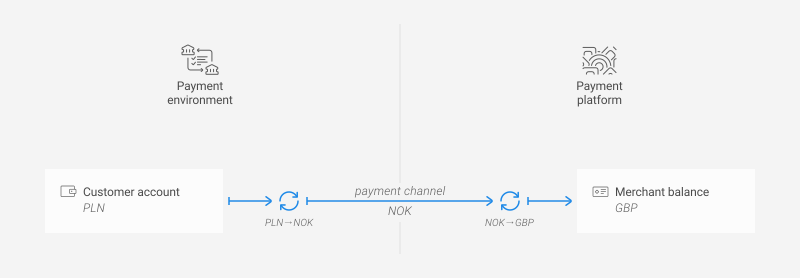
For example, a customer in Poland pays with a card denominated in Polish zloty (PLN) for a service in Norway. By default, the available payment channel supports Norwegian krone (NOK), while the merchant's balance is in pounds sterling (GBP).
However, if in this integration there is an available payment channel in British pounds, then this payment can be processed in pounds, without conversion from the operation currency to the balance currency. If there is an available payment channel in zloty, then this payment can be processed in pounds, without conversion from the payment instrument currency to the operation currency. Thus, supporting payment channels and balances in different currencies allows for greater flexibility in payment processing and can eliminate the need for additional steps with currency conversion. At the same time, in the Ecommpay platform, there are also practical considerations regarding the use of multiple balances and the constraints that come into play when different payment methods, channels, and balances are involved.
When payments are processed, the currency conversion is performed automatically, as deemed necessary. Keep in mind that the actual operation currency is determined in the platform each time based on the request parameters, customer's preference for the payment currency (if applicable), project and payment method settings (including the preferences for currencies and channels indicated by the merchant), and the availability of payment channels.
In addition, currency conversion can also be performed on the side of the web service before the request is sent to the payment platform, with the use of the merchant's exchange rates and under their own terms and conditions.
Choosing the currency
When working via Payment Page, you can decide on the way your customers will select the currency of the payment, and the options are as follows.
- Choosing the currency in the web service—customers choose the currency they prefer before Payment Page is opened. Conversion is performed on the web service side. The selected currency becomes the requested payment currency and is processed accordingly by the platform. This option is available by default for all payment methods and currencies.
- Choosing the currency in Payment Page—customers choose the currency they prefer directly in Payment Page (details). Conversion is performed on the Ecommpay side. The currency specified in the request remains the initial requested payment currency, while the currency chosen by the customer becomes the selected payment currency and takes priority for processing. By default, it also acts as the actual operation currency for the payment. This option is available only for some payment methods and supported currencies for these methods.
Monitoring payments with currency conversion
To monitor the use of various currencies and currency conversion during payment processing, you can rely on various tools including: callbacks (details), consolidated registers and payment information tabs in Dashboard (details), information retrieved via the Data API (details), and financial statements (details).
- Payment result callbacks (details).
- Consolidated registers and payment information tabs in the Dashboard interface (details).
- Information about operations retrieved via the Data API (details).
- Financial statements.
Note that when conversion is performed by the Ecommpay payment platform, the applied exchange rates are determined dynamically based on the market data provided by specialised partner organisations. For any questions regarding these rates, applicable fees, or the use of conversion in specific cases, please contact your Ecommpay account manager.