Processing purchases with partial approval
An article about the capability of processing purchases via Payment Page with the payment amount partially approved by the issuer.
Overview
During payment processing, you can encounter situations when the customer's account has insufficient balance for paying the full amount, but you would rather accept a portion of the payment amount than decline the whole payment. For example, this could apply to flexible top-ups of a customer's balance in the web service or to bookings where the remaining balance can be settled later when the service is actually provided. To accept such payments and avoid declining them due to insufficient funds, you can use the functionality of partial approval when a portion of the payment amount is approved by the issuer. This feature is supported by certain card networks.
The Ecommpay payment platform supports processing purchases with partial approval for standard card payments made with Mastercard and Visa via the Gate API (details) or the standard edition of Payment Page. This capability is enabled for specific projects upon agreement with your Ecommpay account manager, following which you can request to apply partial approval to each payment initiated on the side of the web service. To do so, you can use the dedicated allow_partial_approval parameter in the API specification for opening Payment Page.
The Ecommpay payment platform supports processing Mastercard and Visa payments with partial approval.
If you indicated that partial approval is allowed, then the customer will be shown a corresponding warning in the tab for entering card details.
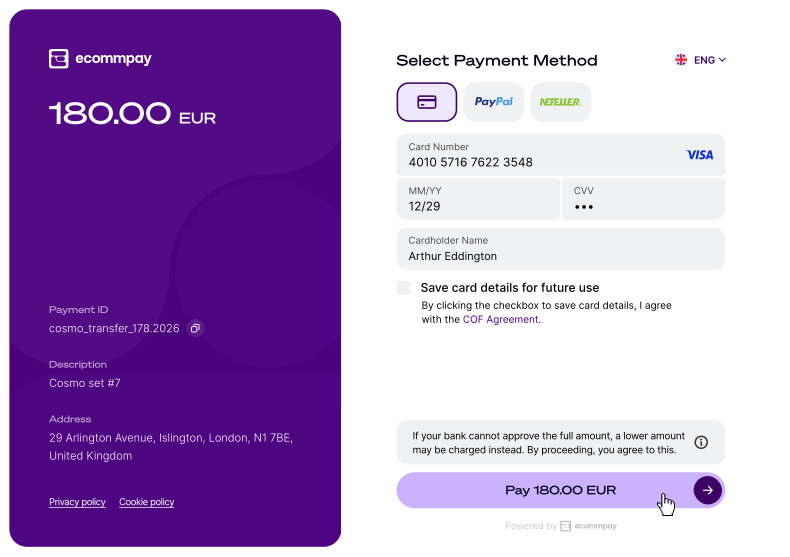
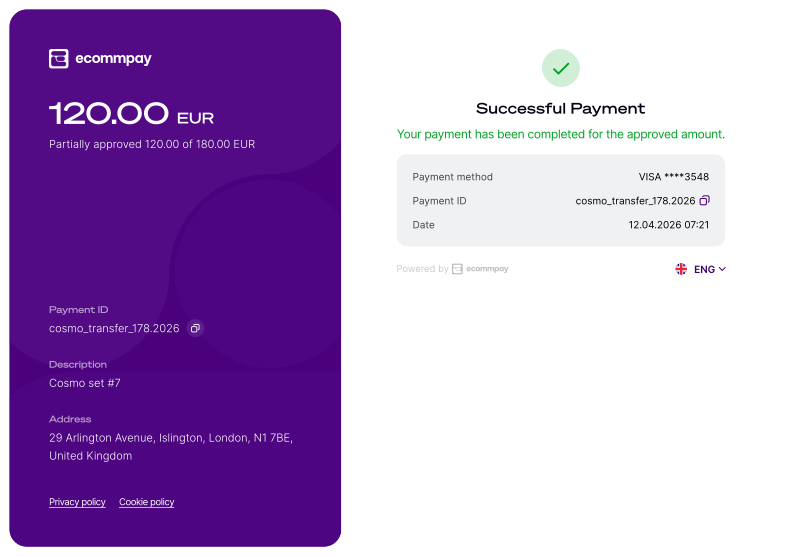
The exact amount for which the purchase can be authorised is determined each time by the issuer of the card used for making this purchase (the amount depends on the customer's current account balance and the issuer's processing rules). The information about this amount is passed from the issuer's service to the Ecommpay
payment platform where the approved amount is treated as the actual payment amount, while the initially requested payment amount is ignored. Note that this change can affect subsequent operations within this purchase, for example, capturing the funds held as part of a two-step purchase, or refunding the purchase amount. For example, if the purchase for the initially requested amount of 100 EUR was partially approved for the amount of 90 EUR (the sum actually paid by the customer), partial refund can be requested only for the amount no more than 90 EUR. The difference between the initial and approved amounts can be paid (and refunded, if necessary) separately, with the use of a separate payment request.
The use of partial approval capability does not affect standard processing workflows of one-step and two-step purchases regarding the interaction between the web service and the payment platform. However, when using this capability, you should be aware of changes in the request and callback formats (more on this below) and be ready to supplement user scenarios as follows. You need to:
- Inform your customers that partial approval capability is available or make sure they can consent to this payment option—before every purchase to which partial approval feature applies.
- Inform your customers about the partially approved and paid amount—after every purchase with partial approval has been completed.
- Provide your customers with the option to pay the outstanding amount through an additional payment (by reopening the payment form or via a different interface, allowing a different payment instrument to be used)—if necessary.
- Ensure the possibility to refund the paid amount—if necessary.
- Add other changes and modifications—if it is dictated by the specifics of the web service or the services you provide.
It is also important to monitor partial approvals on the web service side. Make sure to keep track of initially requested and actually approved amounts for each purchase to which partial approval feature applies.
If you have questions about the integration of the partial approval capability, refer to your Ecommpay account manager. If you have technical questions about the use of this capability, refer to the Ecommpay support specialists.
Special aspects and limitations
When working with the capability of processing purchases with partial approvals, consider the following special aspects and limitations:
- This capability is enabled on a per-project basis and can be applied to a specific payment only if the following conditions are met:
- Partial approval is available for the project in use.
- The payment is processed via the Gate API or the standard edition of Payment Page.
- The payment method is standard card payments.
- The card used to make the payment is issued and serviced by Mastercard or Visa.
- The issuer supports payments with partial approval.
In all other cases, partial approval is not applicable. If the customer does not have sufficient funds, the payment is declined even if you indicate that the partial approval is allowed in the request.
Notice: Note that due to restrictions on allowed interfaces and payment method-specific restrictions, partial approval is not supported for specialised versions of Payment Page, mobile SDKs, CMS plug-ins, and payment links, and cannot be applied to Click to Pay and Visa Instalments payments. - Partial approval can be applied to processing purchases and authorisation holds, including those with COF purchase registration.
If a COF purchase is registered, the initial payment can be partially approved. However, even if the initially requested payment amount has been changed due to partial approval, the actual amount of the series of debitings that is being registered will not be affected and will remain as initially requested.
- This capability can be combined with other additional capabilities available for working with Payment Page.
In certain cases, however, you need to account for the specifics of combining such functionalities. For example, in case of combining with collecting customer data, the fields for additional information will be placed not on the page for entering payment information, but on a separate page that follows. If you provide the option of payment retries, in this case, the retry attempts will only be offered upon full decline of the previous attempt and will be initiated for the originally requested amount. If an attempt results in partial approval, no further retries will be initiated and paying the remaining amount with the use of this capability will not be allowed.
- After the feature of partial approval was applied, the actual payment amount is the amount approved by the issuer.
This factors in when currency conversion is used and it affects the subsequent operations within the payment including refunds and various actions performed after placing the authorisation hold (increasing or decreasing the previously authorised amount, capturing the held funds or cancelling the hold, even if these operations are initiated automatically).
Setup, testing, and use
To enable the partial approval capability:
- With your Ecommpay account manager, discuss and agree upon setting up this capability and whether testing is necessary.
- If needed, you need testing, get notified by the Ecommpay specialists that the capability is ready for being used in test mode, test this capability, and inform Ecommpay that everything is ready to launch.
- Get notified by the Ecommpay specialists that the capability has been added and fully set up.
To test accepting purchases with partial approval, process at least one purchase in your test project using the request format described below and specifying test data. Make sure that you get the following results:
- If you test processing a purchase for the amount greater than
120 EUR(12000in the smallest currency unit) with the use of test card numbers5126160000356675or4010571676223548, the charged amount should be120 EUR. In this testing scenario, all other parameters, including the name of the cardholder or the verification code, can contain arbitrary values but should be specified in appropriate format (for example, the card expiry date must occur after the payment date). - In all other cases, the purchase amount should be charged in full or the purchase should be declined (according to the processing scenarios set up for the project).
To indicate that partial approval can be applied to a specific payment, make sure the capability has been enabled and to include the allow_partial_approval parameter with 1 specified as its value in the payment request sent from the web service to the payment platform (more below).
Request format
When sending requests to open Payment Page for processing purchases with partial approval, consider the following:
- Each request must contain objects and parameters required for performing an action of a specific type (more information can be found in the descriptions of request formats for opening the payment form to initiate one-step purchases, place authorisation holds, and register COF purchases.
- Each request must contain the
allow_partial_approvalparameter with1specified as its value. If0is passed, or this parameter is not passed in the request at all, partial approval is not allowed. - Additionally, any other parameters supported by Payment Page in the Purchase operation mode can be used. They are included in the API specification.
{
   "project_id": "42",
   "payment_id": "456789",
   "payment_currency": "EUR",
   "payment_amount": "10000",
   "customer_id": "customer_12",
   "customer_phone": "44991234567",
   "allow_partial_approval": 1,
   "signature": "TSzdE5rJZaA9TYAKoGpfXriFf82MxF..."
}
{
   "project_id": "42",
   "payment_id": "456789",
   "payment_currency": "EUR",
   "payment_amount": "10000",
   "customer_id": "customer_12",
   "customer_phone": "44991234567",
   "allow_partial_approval": 1,
   "signature": "TSzdE5rJZaA9TYAKoGpfXriFf82MxF..."
}
Callback format
Results of purchases with partial approval are communicated in callbacks with standard format. To learn more about the callback format, see Handling callbacks. Note that parameters sum and sum_converted passed in the payment and operation objects contain the amount approved by the issuer, and this amount should be used for reporting and reconciliation.
{
    "account": {
        "number": "431422******0056",
        "type": "visa",
        "card_holder": "PROSTETNIK JELTZ",
        "id": 45678,
        "expiry_month": "08",
        "expiry_year": "2035"
    },
    "customer": {
        "id": "customer_12",
        "phone": "44991234567"
    },
    "payment": {
        "date": "2026-01-11T13:02:42+0000",
        "id": "456789",
        "method": "card",
        "status": "success",
        "sum": {
            "amount": 9000, // approved amount
            "currency": "EUR" // currency code
        },
        "type": "purchase",
        "description": ""
    },
    "project_id": 42,
    "operation": {
        "id": 969000002636,
        "type": "sale",
        "status": "success",
        "date": "2026-01-11T13:02:42+0000",
        "created_date": "2026-01-11T13:01:45+0000",
        "request_id": "c6eed1eb14c629b4ef20b3b8086d...d04132c34b0088cbc0be4667c",
        "sum_initial": {
            "amount": 9000, // requested amount
            "currency": "EUR" // currency code
        },
        "sum_converted": {
            "amount": 9000, // approved amount
            "currency": "EUR" // currency code
        },
        "provider": {
            "id": 408,
            "payment_id": "330157196",
            "date": "2026-01-11T13:02:32+0000",
            "auth_code": "",
            "endpoint_id": "612266625"
        },
        "code": "0",
        "message": "Success",
        "eci": "07"
    },
    "signature": "v7KNMpfogAxwRIL9tVftZ1ZZ5D/aZAeb0VMdeR+CqGrNxYyilUwSm...=="
}
{
    "account": {
        "number": "431422******0056",
        "type": "visa",
        "card_holder": "PROSTETNIK JELTZ",
        "id": 45678,
        "expiry_month": "08",
        "expiry_year": "2035"
    },
    "customer": {
        "id": "customer_12",
        "phone": "44991234567"
    },
    "payment": {
        "date": "2026-01-11T13:02:42+0000",
        "id": "456789",
        "method": "card",
        "status": "success",
        "sum": {
            "amount": 9000, // approved amount
            "currency": "EUR" // currency code
        },
        "type": "purchase",
        "description": ""
    },
    "project_id": 42,
    "operation": {
        "id": 969000002636,
        "type": "sale",
        "status": "success",
        "date": "2026-01-11T13:02:42+0000",
        "created_date": "2026-01-11T13:01:45+0000",
        "request_id": "c6eed1eb14c629b4ef20b3b8086d...d04132c34b0088cbc0be4667c",
        "sum_initial": {
            "amount": 9000, // requested amount
            "currency": "EUR" // currency code
        },
        "sum_converted": {
            "amount": 9000, // approved amount
            "currency": "EUR" // currency code
        },
        "provider": {
            "id": 408,
            "payment_id": "330157196",
            "date": "2026-01-11T13:02:32+0000",
            "auth_code": "",
            "endpoint_id": "612266625"
        },
        "code": "0",
        "message": "Success",
        "eci": "07"
    },
    "signature": "v7KNMpfogAxwRIL9tVftZ1ZZ5D/aZAeb0VMdeR+CqGrNxYyilUwSm...=="
}
{
    "account": {
        "number": "431422******0056",
        "type": "visa",
        "card_holder": "PROSTETNIK JELTZ",
        "id": 45678,
        "expiry_month": "08",
        "expiry_year": "2035"
    },
    "customer": {
        "id": "customer_12",
        "phone": "44991234567"
    },
    "payment": {
        "date": "2026-01-11T13:02:42+0000",
        "id": "456789",
        "method": "card",
        "status": "success",
        "sum": {
            "amount": 9000, // approved amount in the requested payment currency
            "currency": "EUR" // code of the requested payment currency
        },
        "type": "purchase",
        "description": ""
    },
    "project_id": 42,
    "operation": {
        "id": 969000002636,
        "type": "sale",
        "status": "success",
        "date": "2026-01-11T13:02:42+0000",
        "created_date": "2026-01-11T13:01:45+0000",
        "request_id": "c6eed1eb14c629b4ef20b3b8086d...d04132c34b0088cbc0be4667c",
        "sum_initial": {
            "amount": 9000, // requested amount in the requested payment currency
            "currency": "EUR" // code of the requested payment currency
        },
        "sum_converted": {
            "amount": 7805, // approved amount in the actual operation currency
            "currency": "GBP" // code of the actual operation currency
        },
        "provider": {
            "id": 408,
            "payment_id": "330157196",
            "date": "2026-01-11T13:02:32+0000",
            "auth_code": "",
            "endpoint_id": "612266625"
        },
        "code": "0",
        "message": "Success",
        "eci": "07"
    },
    "signature": "v7KNMpfogAxwRIL9tVftZ1ZZ5D/aZAeb0VMdeR+CqGrNxYyilUwSm...=="
}
Useful links
The following materials can be useful when you work with the capability of partial approval:
- Purchase processing—an article about processing via Payment Page one-step purchases with immediate debiting of funds.
- Authorisation hold—an article about placing a hold on funds via Payment Page as part of processing two-step purchases with subsequent debitings.
- COF purchase registration—an article about registering via Payment Page purchases followed by a series of recurring debits.
- Payment retries— an article about the capability of providing customers with additional payment attempts via Payment Page if the previous attempt to pay has failed, with the option to select the payment method.
- Collecting customer data—an article about the capability of obtaining and using additional customer information during payment processing via Payment Page to minimise the need for auxiliary procedures.
- Handling payment processing information—a section with articles about different ways to receive data that merchants can use to monitor and analyse payment processing activity.
- Sending receipts and notifications to customer—an article about the capability of informing customers about payment processing and related events via email notifications.